Clients ring to ask whether tomorrow is covered
Automatic status updates
The client is notified when the job is scheduled and again when Crew is confirmed. The check-in call stops happening because the answer arrived first.
Your clients request shifts, invite from their own approved Crew and approve hours themselves — and the system tells them the moment a job is scheduled and Crew confirmed. No coordinator in the loop.
The same night, on three screens
Your client — awake
Your 7:00 am job is fully covered
4 of 4 Crew confirmed · tap to view
Request Crew
Northside Medical · client portal
4 × Certified Nursing Assistant
Tomorrow, 7:00 am – 3:00 pm · Night wing
Submit requestYour office — nobody signed in
Your office — open, 7:00 am
NextCrew — Dispatch
No one signed inNextCrew — Dispatch
Signed in · 7:00 amWhile you were closed
Your Crew — invited
Your Crew — all four accepted
New shift invitation
Northside Medical · 11:05 pm
Certified Nursing Assistant
Tomorrow, 7:00 am – 3:00 pm · 3.2 mi away
Approved Crew · 12 invited
8 hrs
Office closed
1 job
Requested and filled
The people placing your orders now are the generation that books everything else themselves, at any hour, from a phone. They do not want to call, and they will not wait for your office to reopen. Agencies built to run like platforms already let them — and that work is going somewhere. Client self-service is how you compete for it without adding a night shift.
When a job is scheduled and again when Crew is confirmed, your client is notified automatically. Nobody on your team sends it. Most client portals are the opposite — the client has to log in and go looking.
Job privacy decides who can even see a shift — your whole pool, this client's approved Crew only, or invitation only. Do Not Return is a hard block enforced in matching, not a note someone might read.
The client approves hours and rates the Crew Member in the same action. Approved hours move to payroll and the invoice is generated here. Most self-service stops at order intake and hands the rest back to your team.
The client
Signs in to your branded portal on a laptop or a phone. Submits the shift, invites from the Crew you have approved for their site, watches it fill, approves hours when the shift ends and rates the Crew Member in the same click.
What they get: the answer before they thought to ask for it.
The Crew Member
The invitation lands in the app. They accept, and the client's own site instructions — where to park, which entrance, what to wear — are on their phone before they leave the house.
What they get: a shift they can accept at 6am without phoning anyone.
Your coordinator
Order intake and status calls stop arriving. What is left is the work that was always the job: a Crew Member who cancels at 5am, a client who needs a difficult role filled, an account that needs a conversation.
What they get: their morning back — not their
notice.
Two screens carry the second half of the loop. One is where they place a request and watch it fill. The other is where they close the shift out — hours approved and the Crew Member rated, in the same place.
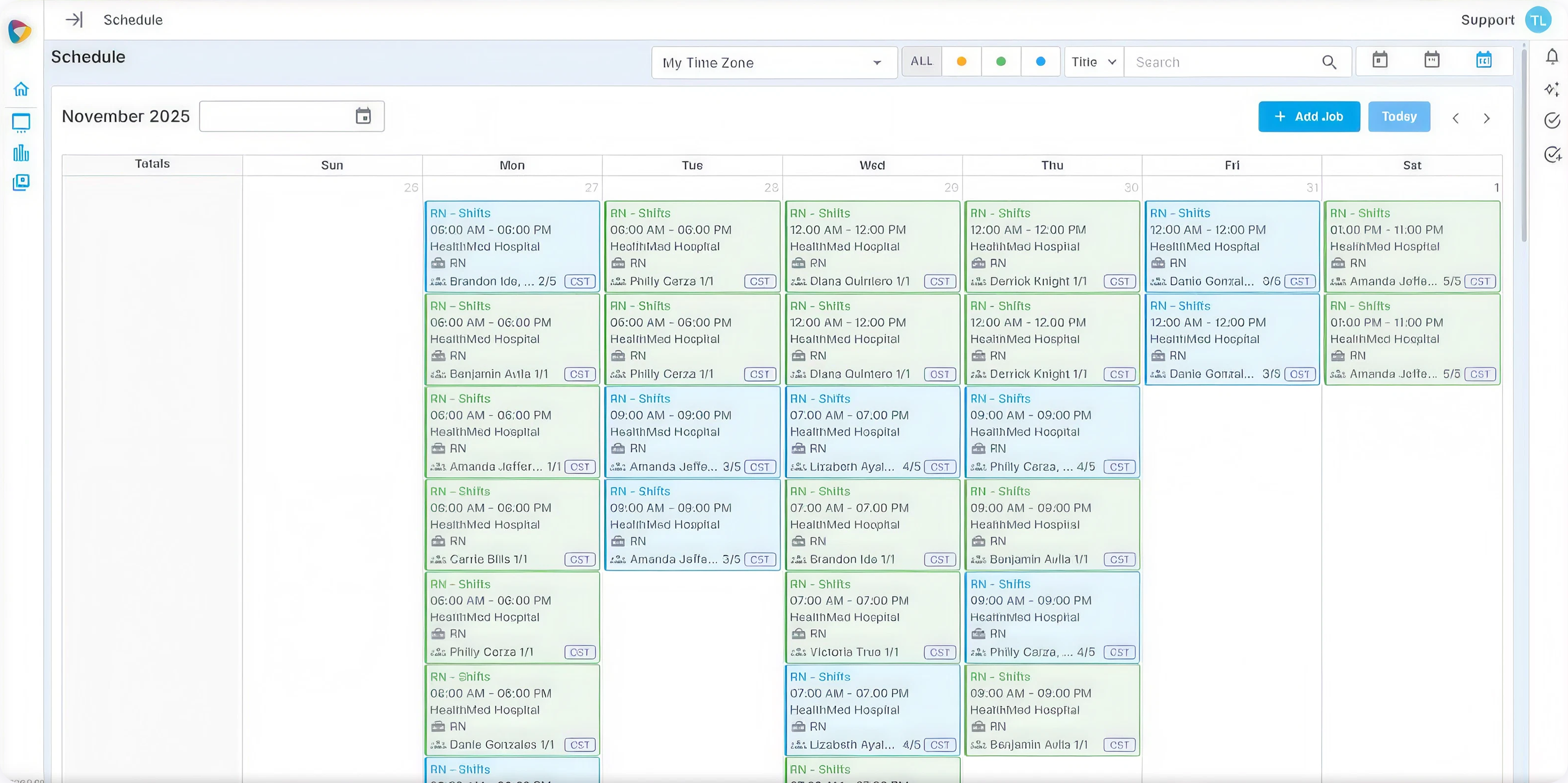
Add Job is the whole argument in one button — the client raises their own shift without ringing anyone, at whatever hour suits them. Then every card shows how many Crew are confirmed against how many they asked for, color-coded, so the answer to "are we covered?" is already on the screen.
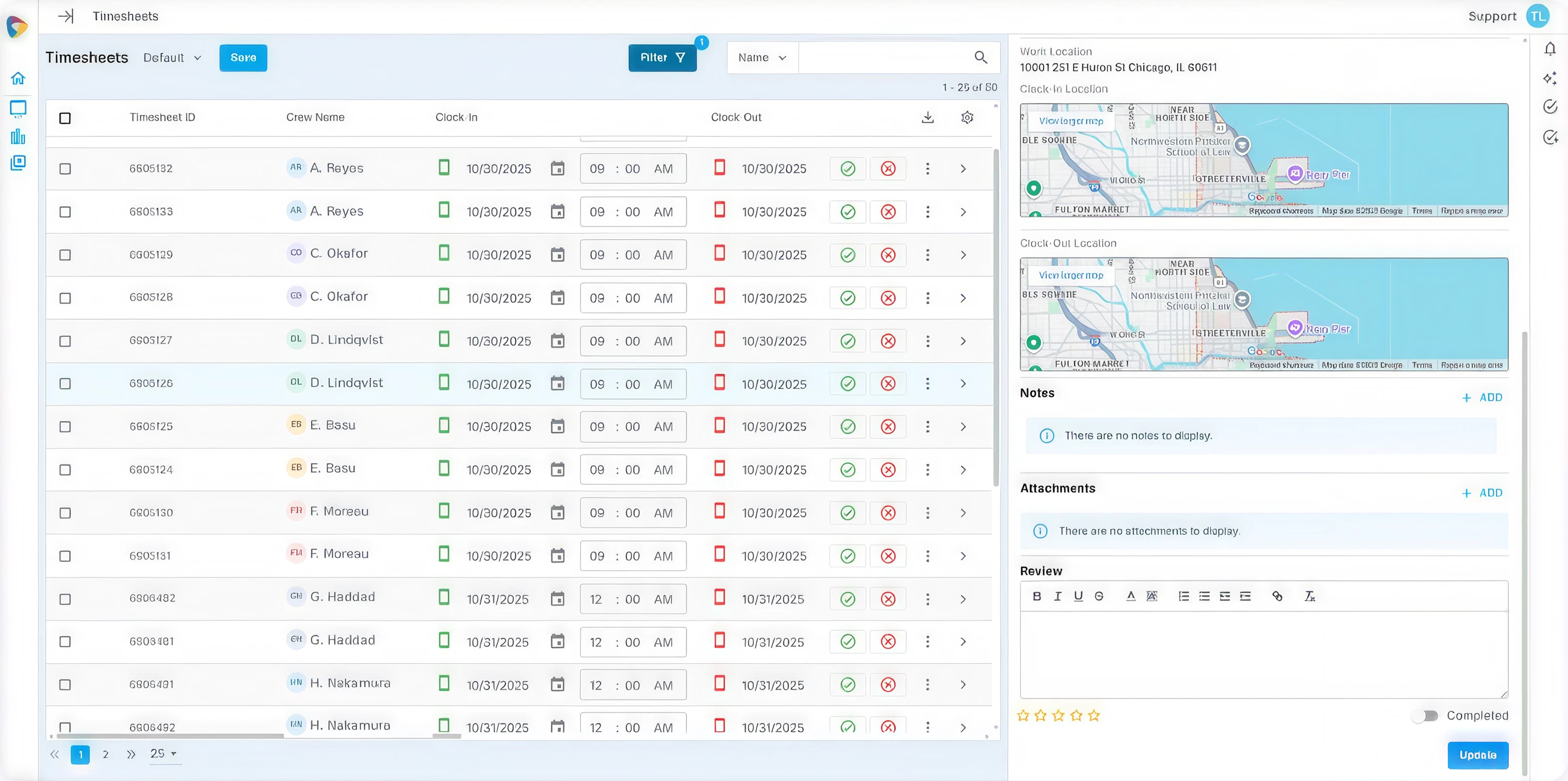
Clock-in and clock-out arrive with their verified locations on the map, so the client is approving what actually happened rather than what someone typed. The review and star rating sit in the same panel — which is why approval and rating end up being one action instead of a favor you have to ask for later.
Every capability below is a coordinator task your client now handles themselves — or a workflow that runs automatically.
Clients ring to ask whether tomorrow is covered
The client is notified when the job is scheduled and again when Crew is confirmed. The check-in call stops happening because the answer arrived first.
Anyone in the pool could end up on a client's site
Every job carries a visibility rule — open to your whole pool, restricted to this client's approved Crew, invitation only, or limited to credentialed Crew. The client self-serves inside the boundary you set.
The one person a client asked never to send back, comes back
A client's favorites rise to the top when their jobs are filled. Do Not Return is a hard rule — however available or qualified that Crew Member is, they are not matched to that client's work.
Rates re-entered on every order
Pay and bill rates live on the client record and populate every job created for them — including the ones the client creates themselves. Set once, and a self-service order cannot be booked at the wrong rate.
Every contact at a client sees everything, or nothing
The site manager who books shifts, the supervisor who approves hours and the person who handles billing are different people. Each gets their own access, scoped to what their job needs.
Every client is told the same site rules, by a person, every time
Parking, entrances, check-in, dress code and conduct live on the client record and reach every Crew Member booked to that site. In the app, before the shift. Written once instead of repeated forever.
| WITHOUT NEXTCREW | WITH NEXTCREW |
|---|---|
|
Without NextCrew
THE 11PM REQUEST A site manager needs four people for the morning. Your office is shut, so they text whoever answers, or they open an app that isn't yours. By the time anyone reads it, the shift has been filled by somebody else. |
With NextCrew They open your portal and place the request. Matching runs immediately and invitations go out that night. The work stays yours because you were the one still open. |
|
The 6am scramble Your coordinator starts the day with a list of unfilled shifts and a phone. Every fill is a call, and every call is a person who may not pick up. |
They open the day to a job that filled overnight, and spend the morning on the two that genuinely need a human instead of the twenty that did not. |
|
"Is it covered?" The client rings to check. Someone stops what they were doing, looks it up, calls back. Repeat for every client, every day — the tax nobody puts on a rate card. |
Nobody rings, because the client was told when the job was scheduled and again when Crew confirmed. The status conversation stops being a conversation. |
|
End of shift, and month end Chasing approvals by email, rebuilding the invoice from a timesheet, a rate sheet and someone's memory. The bill goes out days after the work was done. |
The client approved hours and rated the Crew Member when the shift ended. Approved hours reach payroll and the invoice is generated from the same record. |
Powered by CrewPilot AI — Workspace AI
Workspace AI — Monitoring
Workspace AI scores every incoming request against the Crew who are actually eligible for that client — right position, sensible distance, available that day, not excluded — and puts the invitation in front of them straight away. It surfaces and ranks; your rules decide who is eligible; the workflow sends. Nobody has to be awake for any of it.
SIGNAL
A client submits a shift
SCORED
Eligible Crew ranked
ACTION
Invitations go out
OUTCOME
Filled, client told
Workspace AI is one of seven intelligence modules inside the CrewPilot AI Command Center, the read-only hub where your team watches what the platform is surfacing.
Recruitment AI
Workspace AI
Crew AI
Compliance AI
Ops Intelligence AI
Client Health AI
Financial AI
Staffing CRM, Talent Pool, and White Label feed into the Client Self-Service Marketplace. Timesheets, Payroll, and Invoicing flow out from it.
FEEDS IN FROM
Client Self-Service Marketplace
You are here
2.2M
Working for US staffing companies in an average week. The scale of the work that gets requested, filled and paid on a weekly cycle.
American Staffing Association, 2024 data
36%
The largest single segment, ahead of office-clerical at 24%. Shift-based work where a request and a start time are often hours apart.
American Staffing Association, 2024 data
27,000
Across roughly 54,000 offices. A client who cannot place an order with you tonight has somewhere else to place it.
American Staffing Association, 2021 data
NextCrew surfaces these in real time — no report needed. There is no published industry benchmark for client self-service in staffing, so these are read as trends against your own baseline rather than against a target somebody else set.
The adoption metric. If this is not climbing, self-service was switched on but never rolled out.
Trend against your own baseline
Time from a client submitting a shift to the last Crew Member confirming. The number that proves you are open when the office is not.
Trend against your own baseline
Shift end to client approval. It gates the invoice, so it gates the cash.
Trend against your own baseline
How often a client's approved pool covers their own work. Rising means the pool is maturing and matching is getting easier.
Trend against your own baseline
How many times a person had to intervene. The honest measure of whether the loop actually closes on its own.
Trend against your own baseline
Dashboard shows representative data, not a screenshot of a live account. Client names are fictional. No industry benchmark is cited here because none exists for client self-service in staffing — inventing one would be worse than leaving it out.
$32,500
Order entry and "is it covered?" calls, at ten hours a week. Not the difficult work — the work a client could have done themselves at 11pm.
10 hrs/week × $62.50 fully-loaded hourly × 52 weeks. Swap in your own rate and hours.
128 hrs
A weekend runs 64 hours from close to open. Across a year of weekends alone, that is the window in which a client with an urgent shift finds out who else answers.
64 hrs per weekend × 2 weekends shown. Over 52 weekends it is 3,328 hours a year.
30–60
Approval is the first gate on that clock. When the client approves hours the day the shift ends rather than the week after, the invoice starts its own clock sooner.
CreditPulse DSO benchmarks, 2025 — professional services, not staffing-specific.
1 in 4
A client who wanted to book online and could not usually does not say so. They place the easy, urgent work somewhere self-service and keep giving you the planned work — so volume drifts without a conversation.
Illustrative, not measured. Replace it with your own share of urgent versus planned volume.

GUIDE
What to decide before you open ordering to clients — which accounts go first, what stays with your team, and how the pool gets built.
Read the guide
GUIDE
The rollout, from the first client contact who gets a login to the point where most of your orders arrive without a phone call.
Read the guideSee what your clients would be able to do for themselves, and what would still come to your team.
Built for staffing agencies since 2012.