


New in NextCrew: Channels — group chat for your team, your Crew and your clients. See what's new →
Nextcrew Logo
LEARNING HUB

What's New at NextCrew

Product updates and releases for staffing agencies: what changed, who it helps, and how to start using it.

Latest Release

New In NextCrew: Channels

New Crew Communication

One conversation for everyone on the job

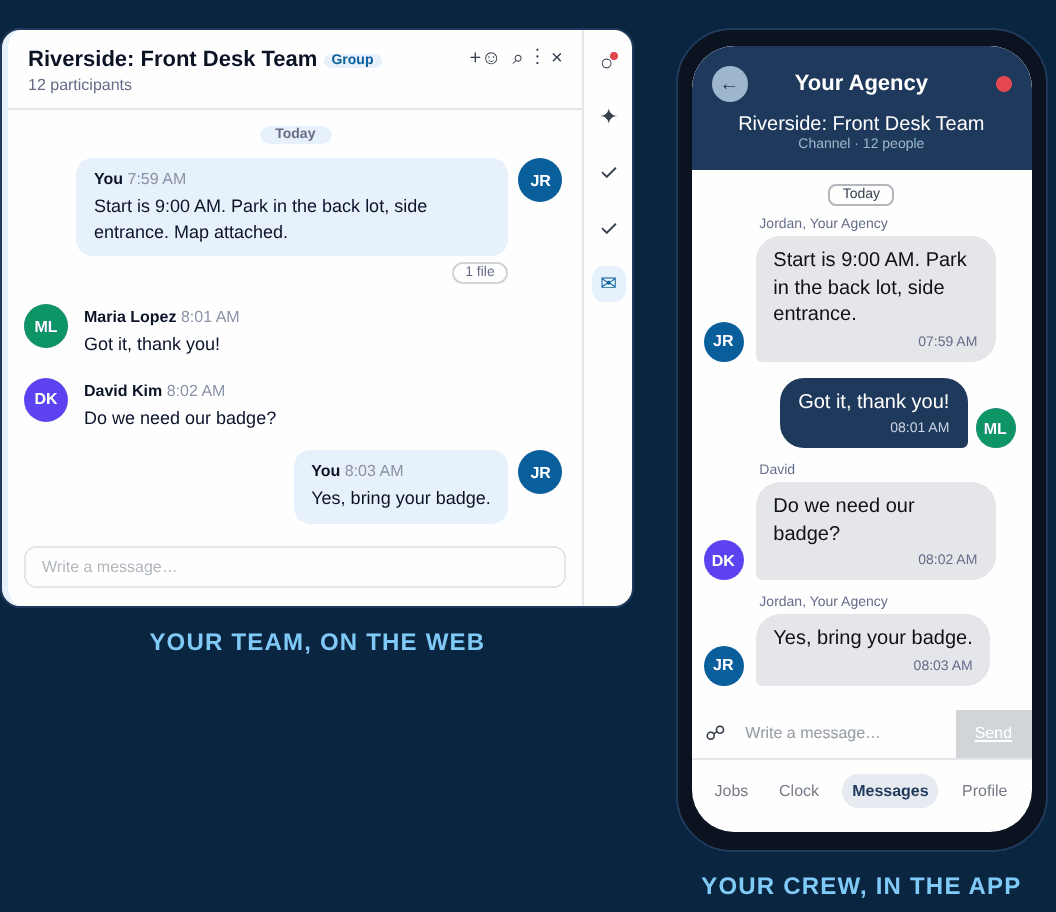
Channels brings group chat inside NextCrew. Your team, your Crew and your client talk in one place, so updates reach everyone at once and stay with the agency, not on someone's personal phone.

  • Start a channel from any screen, an order or a job
  • Crew reply in the NextCrew app, clients by email
  • Only your team creates channels and decides who is in them
Channels in NextCrew: a job channel on the web and the same conversation in the Crew app
Earlier Releases

More From What's New

NextCrew
Zapier
Automation

Connect NextCrew to the rest of your stack, no code

The NextCrew app is live in Zapier's directory. Pick a NextCrew trigger, pick an action in another app, and Zapier runs that pairing from then on, without a developer and without a support ticket.

Read about the Zapier integration
Crew App

Channels, now on your Crew's phone

The latest NextCrew app update puts Channels in your Crew Members' hands. They open Messages, then Channels, and answer the job conversation from the phone they already carry. Android lands first, iOS a day or two behind, and agency-branded apps shortly after.

About the NextCrew Crew app
From The Blog

Ideas For Running Your Agency

All articles
No Call No Show Policy for Staffing Agencies

Staffing Operation

No Call No Show Policy for Staffing Agencies: Template and Rules

Read Full Article
What Is a VMS and MSP in Staffing

VMS & MSP

What Is a VMS and MSP in Staffing? A Guide for Agencies

Read Full Article
FAQs

Questions About NextCrew Releases

The releases on this page, newest first: Channels, group chat built into NextCrew for your team, your Crew and your clients, and the NextCrew app in Zapier's directory, which connects NextCrew to the rest of your stack without a developer. Each release gets its own page here when it ships.

Crew Members read and reply in the NextCrew app, under Messages and then Channels. Client contacts you add to a channel get an email and reply from there, so a client needs no app and no login to take part. Your own team works in the channel on the web.

Yes. The NextCrew app is live in Zapier's directory, with instant triggers for a new, updated or deleted record and actions to create, find or remove one. You choose which kind of record inside the step: Crew, Clients, Jobs, Timesheets or Invoices. Zapier says its directory covers more than 9,000 apps. Zapier also exposes the app over MCP, so an AI assistant can act in NextCrew through the Zapier connection you authorized.

Native integrations cover payroll, screening, communication and VMS, and you can see them all on the integrations and partners page. For anything built to your own specification there is the NextCrew open API. Zapier covers the rest of your stack.
SEE WHAT'S NEW IN ACTION

Every new feature, shown on a workflow like yours.

See how your coordinators, your Crew and your clients would use the latest releases, from the first job request to the Crew Member's phone.