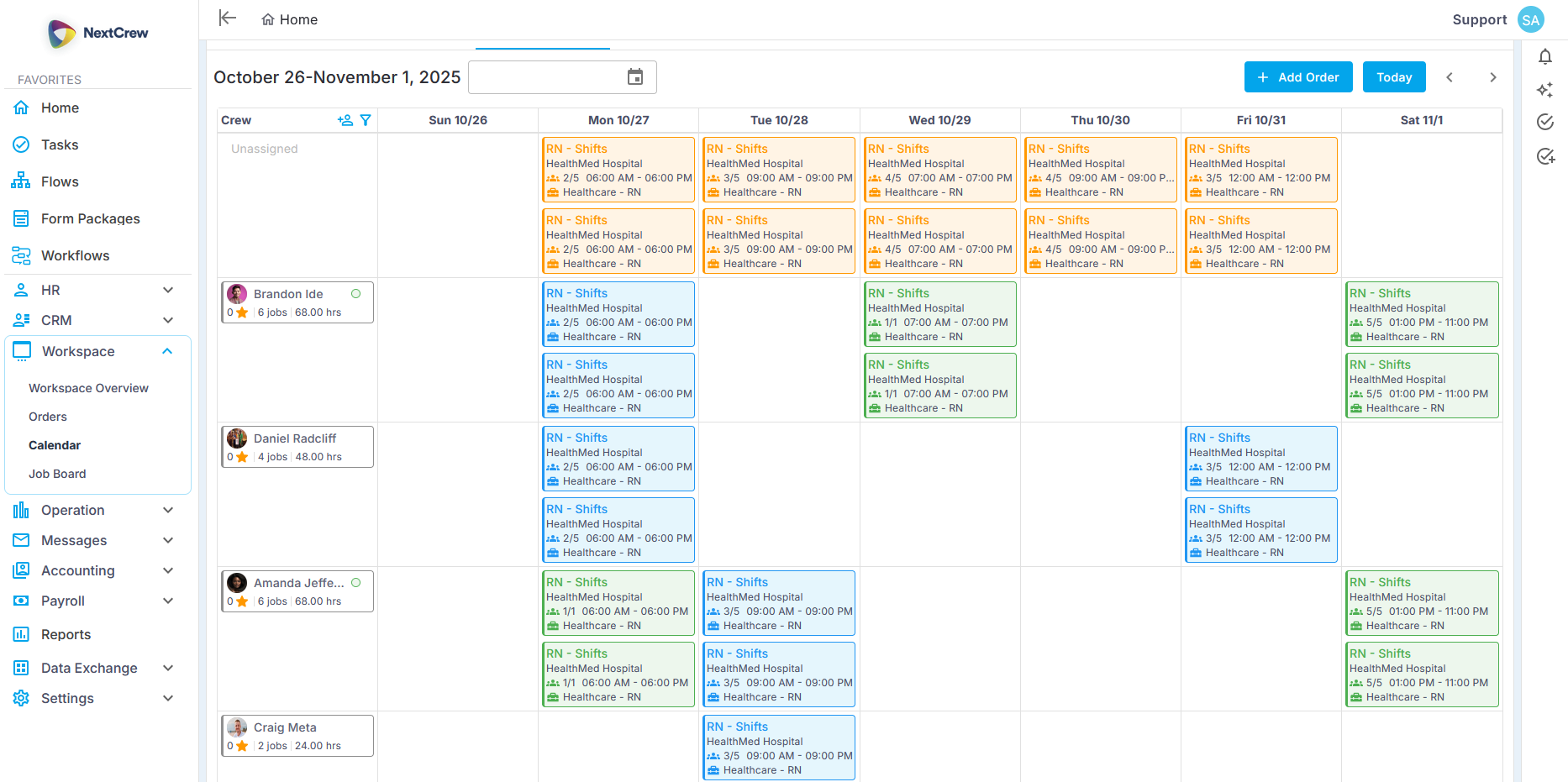
Every job you post is instantly matched to the right workers — based on where they are, what they're qualified for, and what they've done before. Your coordinators stop chasing. Your crew starts getting work they're built for.
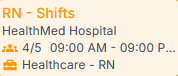
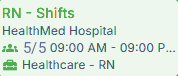
Shift assigned — now 5/5 filled
Crew Member notified automatically
Position Filled Ratio
55%
Filled
Filled Positions
Open Positions
NextCrewnow
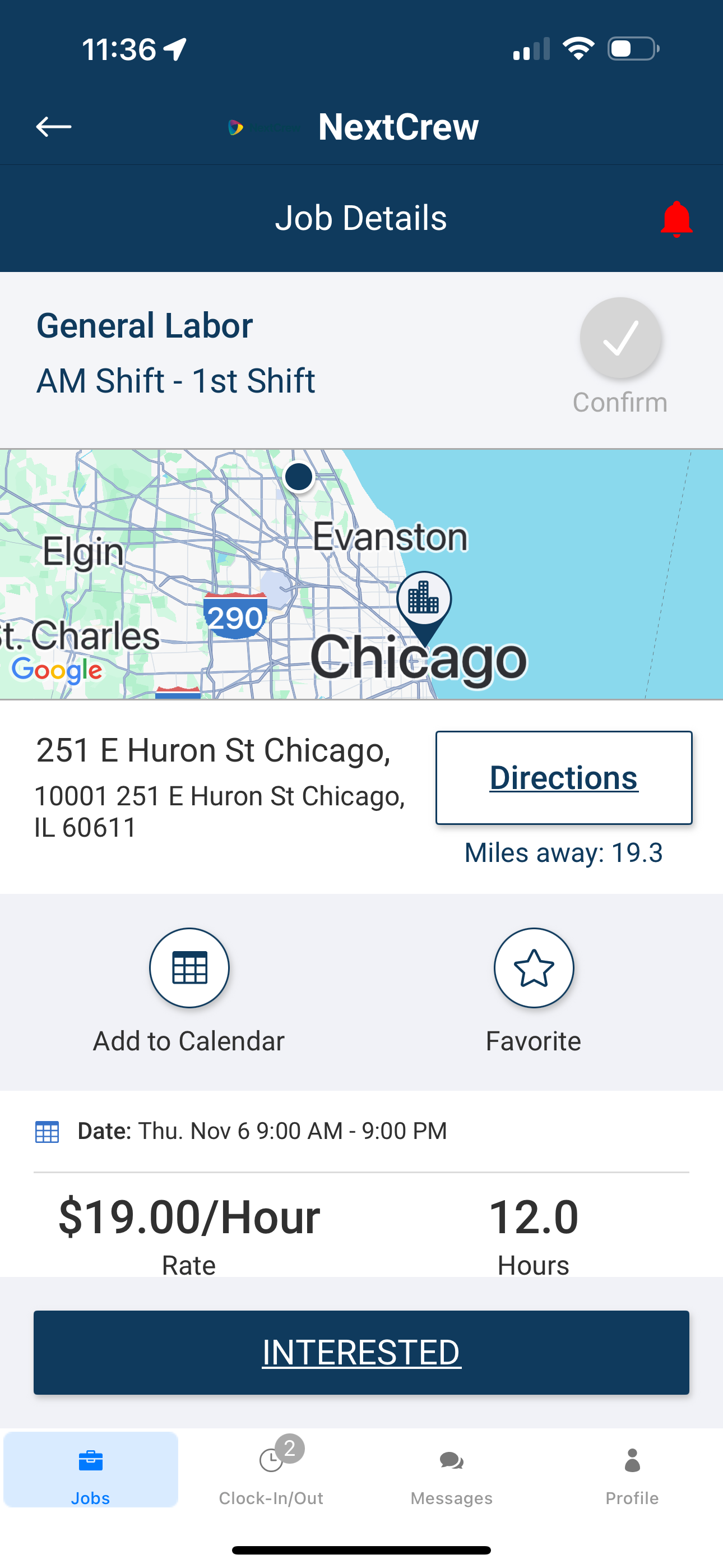
New shift matched to you
General Labor · AM Shift · Nov 6 · $19.00/hr · 19.3 mi
Most staffing platforms give you a calendar. NextCrew gives you a match engine — and a calendar that fills itself.
The moment a job is posted, Workspace AI cross-references your entire crew
pool — location, availability, credentials, client preferences, past performance
— and surfaces the right matches automatically. No manual searching. No
phone trees. Just the right worker, notified instantly, ready to confirm.
WHAT MAKES US DIFFERENT
Built Differently For High-Volume Staffing
Stop Being the Middleman
Post a job once. Matched Crew are invited automatically — by text, app, and email. Crew see their jobs, confirm their shifts, and get automated reminders before every shift. Your coordinators manage exceptions, not inboxes.
Every Job. Right Place. Right Details.
Every job posting carries the exact location, map view, and turn-by-turn directions built in. Workers know where to go before they ask. No wrong-address calls. No day-of confusion. The right crew shows up at the right place, every time.
Every Job Posted. Every Rate Protected.
Bill rate and pay rate are locked at the order level — flowing automatically into every job, every timesheet, every invoice. No manual entry. No rate drift. No margin surprises at the end of the month.
One Platform. Every Vertical You Staff.
Healthcare, hospitality, events, industrial, education — NextCrew runs them all from one platform. Each vertical gets its own compliance rules, rate structures, and workflow logic. You add a new line of business without buying a new tool. One system grows as you do.
Your Fill Rate Is a Revenue Number. Treat It Like One.
Every unfilled shift is lost revenue — not just a scheduling gap. NextCrew gives you real-time fill rate visibility across every client, every location, every job — so you see the problem before the client does, and fix it before it costs you.
Position Filled Ratio
40%
Filled
Filled Positions
Open Positions
HOW IT WORKS
Built For Everyone In The Loop
Coordinators, crew members, clients, and VMS partners — everyone gets exactly what they need, without extra back-and-forth.
Staffing Manager
Your Dashboard. Every Job. Every Status. One View.
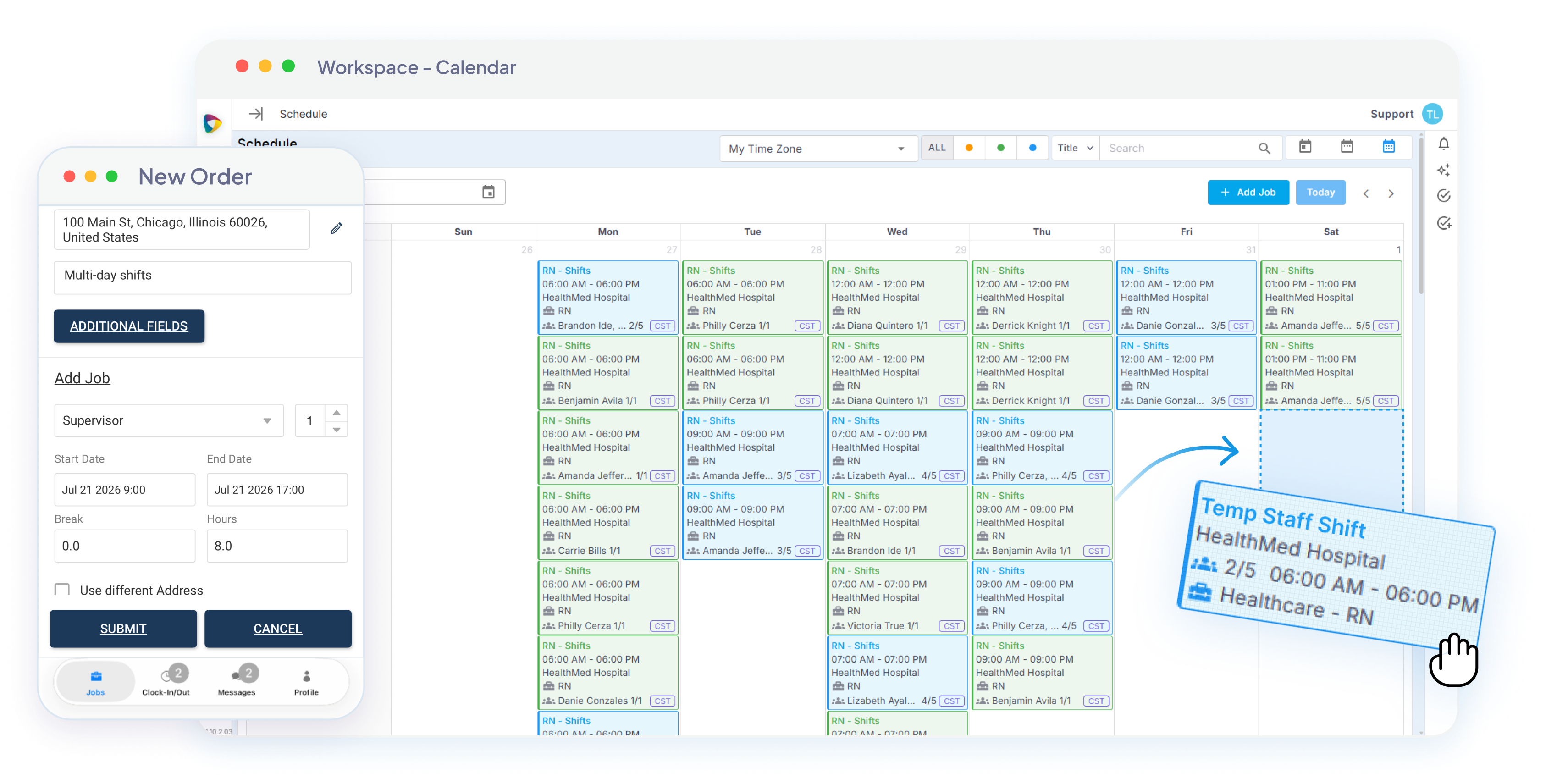
See every open shift, every confirmed crew member, and every pending order — color-coded by status so you know exactly where to focus. AI matching surfaces the best-fit workers automatically, and private posting lets you fill from your trusted crew before opening to the broader pool.
Drag and drop to reschedule — assigned Crew Member notified instantly
Shift assigned — now 5/5 filled
Crew Member notified automatically
Crew Member
Your Shifts. Your Schedule. In Your Pocket.
Crew members see open shifts, claim jobs in one tap, and get automated reminders before every shift — with location, directions, and all job details included. No more back-and-forth texts. No more missed shifts.
Claim shifts directly from the mobile app — first-come or invitation-only
NextCrewnow
New shift matched to you
General Labor · AM Shift · Nov 6 · $19.00/hr · 19.3 mi
NextCrewnow
You’re confirmed for this shift
Added to your schedule. Details in the app.
INTERESTED SENT
CONFIRMED
Confirmed
Client
Real-Time Visibility Into Every Shift.
Clients see who's confirmed for their jobs in real time through the client portal. No status calls. No tab-switching. Full transparency into fill rates, upcoming coverage, and shift details — whenever they need it.
Live portal updates — no coordinator outreach required
VMS Integration
High-Volume Orders. Zero Manual Entry.
Job orders flow in from VMS platforms directly, or import from Google Sheets and Airtable through Zapier. Orders hit the job board in minutes — every one triggering the same matching workflow automatically.
VMS and spreadsheet import — orders on the board in minutes
STEP 01
Your client posts shifts in their own VMS
Nothing changes on their side. They raise the requirement exactly the way they already do.
AUTOMATIC
STEP 02
Jobs pushed to NextCrew
The connection carries the order across on its own. No double entry, no second portal, no coordinator in the middle.
VMS → NextCrewSyncing…
STEP 03
Crew matched and notified
The right Crew Members are matched on qualification, availability, and distance — and hear about it straight away.
FUNCTIONS
Every Function Tied To A Real Problem Your Coordinators Face
Coordinators, crew members, clients, and VMS partners — everyone gets exactly what they need, without extra back-and-forth.
Job orders entered manually, one at a time
VMS & spreadsheet job import
High-volume job orders flow in from VMS platforms or from Google Sheets and Airtable through Zapier. Orders hit the job board in minutes — every one triggering the same matching workflow.
Job changes mid-shift cycle
Instant change broadcasting
When a location, time, or rate changes, every assigned worker is notified instantly across all channels. One update — every worker informed before the next shift starts.
Workers no-show with no warning
Automated pre-shift reminders
Every confirmed worker gets automated reminders
before their shift — with full job details, location, and
directions. The worker who confirmed three weeks
ago still shows up because the reminder did its job.
Coordinator pings workers one-by-one for every open shift
Self-service shift claim
Open shifts are visible to qualified workers in the NextCrew mobile app. Workers claim shifts directly — no coordinator outreach required. First-come, first-served, or invitation-only — your call.
Bill rate doesn't match the invoice
Rate locking at order level
Set the bill and pay rate once, on the order, and every
shift generated from it inherits those rates
automatically. Coordinators can't overwrite them by
hand, so the number that reaches the invoice is the
number you agreed to — margin intact.
Last-minute cancellation, no backup ready
Shift swap & auto-backfill
When a worker cancels or swaps, NextCrew
automatically opens the shift to qualified standby
workers — re-running the matching workflow in
seconds. No coordinator scramble. No early-morning phone calls.
CONNECTED SOLUTIONS
Job Management Sits At The Center Of Everything
Every module feeds in or flows out. Nothing lives in isolation — and nothing requires manual handoff.
Scenario
Without NextCrew
With NextCrew
Filling shifts
Without NextCrew
Your staffing manager opens a spreadsheet, picks a group, and starts texting — half of whom are 40 minutes away. Workers reply asking for job details.
More back-and-forth.
With NextCrew
Job posted. Proximity-matched workers notified automatically across text, app, and email — with every job detail included. Staffing manager reviews confirmations.
Done.
Crew knowledge
Your best staffing manager leaves. Every crew relationship, every performance note, every client preference
walks out with her.
Every rating, placement history, and client preference builds in the system automatically. That knowledge
stays — and gets smarter with every shift.
Overtime & conflicts
A worker hits overtime, or gets confirmed on
two overlapping jobs.
Nobody catches it until the timesheet or shift day. You eat
the cost
either way.
NextCrew flags overtime risk and blocks double booking at the point of scheduling —
before
the worker is confirmed. Make the call
before
it costs you.
Client visibility
The client calls asking who's covering tomorrow's shift. Your staffing manager pulls up
three tabs
to answer.
Clients see who's confirmed for their jobs in
real time
through the client portal. No status calls. No tab-switching.
CREWPILOT AI
From Job Posted to Crew Confirmed. Without Picking Up The Phone.
Powered by CrewPilot AI — Workspace AI
Staffing Manager
Workflow
Workspace AI
Crew Member
Analytics
Metro Hospitality — Banquet Servers · 3 open · Tomorrow 5:00 PM · $75
Live sequence
STAFFING MANAGER
01
Coordinator posts the order
Banquet Servers3 open
River North · Tmrw 5pm$75
Fill orderPrefs › Named › G1 › G2
Order built from a template — positions, rate, instructions, and the fill priority rules attached before anything goes out.
WORKSPACE AI
02
Order scanned for problems
Bill rate above floor
Margin 38% — healthy
Address verified
Workspace AI scans the order for rate, margin, and address problems and flags anything off — before a bad order reaches your crew.
WORKSPACE AI
03
Ranked by priority tier
GROUP 1
MSMaria S. · 1.8 mi
98
JTJames T. · 2.4 mi
95
Prefs › Named › G1 › G2
AI ranks Crew inside each tier your recruiter set — proximity, reliability, credential match, response history, and past performance at this client.
WORKFLOW
04
Invites sent in order
1 · Alex R.declined
2 · Maria S.invited
One per slot · waits, then advances
The platform invites down the ranked list one Crew Member per slot — waits out the response window, advances on a decline or no-response. No mass blast.
CREW MEMBER
05
Crew Member accepts
"I'm in — Banquet Servers, tmrw 5pm" — Maria S.
James T.accepted
Crew see full details, map, and pay on their phone, then accept from the app — self-serve or by invite. Their choice.
WORKSPACE AI
06
Conflicts & overtime checked
No shift overlap · travel OK
Under overtime threshold
Not on client DNR list
Before confirm, AI checks overlap and travel feasibility, predicts overtime cost, and screens the client's DNR list — flagging any risk to the coordinator.
STAFFING MANAGER
07
Coordinator confirms
Maria S. confirmed
James T. confirmed
Priya K. confirmed
A person makes the call and confirms. AI flagged the risks; the coordinator approves.
WORKFLOW
08
Client notified
Client portalupdated
3 of 3 confirmed
The client's portal updates in real time — confirmed crew, names, and times. No status call needed.
ANALYTICS
09
100% fill — dashboard updates
100%
Order fill rate
Fill rate, time-to-fill, and client health tick up automatically — the whole run took under a minute.
Workspace AI is one of seven intelligence modules inside CrewPilot AI Command Center — together they form the full intelligence layer of your platform.
Recruitment AI
Compliance AI
Workspace AI
Crew AI
Ops Intelligence AI
Client Health AI
Financial AI
See all CrewPilot AI modules →
THE DIFFERENCE
Before NextCrew. After NextCrew.
Every row below is a real scenario your coordinators deal with today.
FEEDS INTO JOB MANAGEMENT
CRM
Client orders, bill rates, and account details flow in automatically — no re-entry.
Recruiting & Onboarding
Credentialed Crew Members enter the matching pool the moment onboarding is complete.
Job Management & Scheduling
You are here
FLOWS OUT TO
Timesheets
Every confirmed job pre-populates the timesheet — Crew Member, rate, location already filled.
Payroll & Invoicing
Approved timesheets flow to payroll and invoicing — rates locked, no corrections needed.
MARKETPLACE PARTNERS
Integrations That Make Job Management Stronger
NextCrew connects with the tools your agency already uses — so job orders flow in and notifications flow out without manual intervention.
VMSPARK
Enterprise job orders from VMS and MSP platforms flow directly into NextCrew — cleaned, standardized, and ready to match. Zero manual entry.
Job notifications, shift reminders, and last-minute change alerts reach your crew through Twilio-powered SMS — the channel workers actually respond to.
When you need to expand your pool for hard-to-fill positions, JobTarget distributes your job postings across the right boards — bringing qualified workers into your matching pool.
"Life Saver. I recently had a client requesting 40
employees and it was filled in 1 day. Before
implementing this system, we had to make phone
calls to each employee, and efficiency was very
low. This system frees up our time to focus on
other things."
VP
Volkan Pakis
Director of Operations, Hotel Staffing Solutions
40 in 1 day
Positions filled by Hotel Staffing Solutions on NextCrew — replacing manual phone trees that took days.
Source: Volkan Pakis, Hotel Staffing Solutions
43%
Of churned customers never voice a complaint — they just stop calling. Real-time fill rate visibility by client surfaces the problem before they make the decision.
2024 Gartner Customer Experience Survey
5.0
Software Advice
Verified
Capterra Reviews
TBD
G2 Reviews
HOW DO YOU KNOW IT'S WORKING?
The Metrics That Tell You Your Job Management Is Healthy.
NextCrew surfaces these in real time — no report needed to know where things stand. Targets reflect industry benchmarks for high-volume staffing.
% of job orders filled with confirmed workers. The single most important revenue signal for shift-based staffing.
Industry avg: ~45% (industry benchmark)
Time to Fill
Days from job posted to all positions confirmed. Faster fills win competitive client orders.
Goal: fill in days, not weeks
No-Show Rate
% of confirmed workers who don't show up to their shift. The clearest signal of crew reliability and reminder effectiveness.
Healthy: <5%
Bill Rate Compliance
% of shifts billed at the rate locked at order. Tracks margin leakage before it shows up in your invoice.
Target: 100%
Fill Rate by Client
Which clients are getting reliable coverage — and which are quietly drifting toward a competitor.
Track weekly
Sources: industry benchmarks compiled from Staffing Industry Analysts (SIA) and published staffing-operations surveys. Dashboard widget shows representative data — actual NextCrew dashboards reflect your live agency metrics.
ROI CALCULATOR
How Much Are Unfilled Shifts Costing You?
Most agencies don't know — until they do. And can't unsee it.
500
50
500
78%
50%
99%
$75
$50
$500
Unfilled shifts per month
110
Monthly revenue lost
$8,250
Annual revenue at risk
$99,900
At your current fill rate, you're leaving $99,000 on the table every year. NextCrew agencies typically improve fill rate by 15 – 20% within 90 days — that's $14,850 – $19,800 back.
GUIDES & RESOURCES
Go Deeper On Job Management
Three reads worth your time — and one guide worth downloading.
BLOG POST
How to Prevent and Track Staffing No-Shows: A Complete Guide
Shift reminders, proximity matching, and conflict prevention in one guide.
Every Week Without Automated Matching Is A Week You're Paying For Manual Work
Manual timesheet reconciliation isn't just slow — it's expensive. Every missed rate, disputed hour, and duplicate payroll entry is money your agency already earned and handed back.
$13,000
Per coordinator, per year
The average staffing coordinator spends 10 hours per week manually matching workers to jobs — texting groups, chasing responses, re-sending job details. At $25/hour across 52 weeks, that's $13,000 per coordinator per year spent on work the system should be doing.
43%
Of client losses happen quietly
Per the 2024 Gartner Customer Experience Survey, 43% of customers who churn never voice a complaint — they just stop calling. A client whose fill rate slips week over week rarely warns you; they quietly move orders to the agency that covers them. By the time you notice, the account is already gone.
45%
Industry-average fill rate
Industry benchmarks commonly cite an average staffing fill rate near 45% of orders. Agencies running NextCrew's automated matching consistently push 80%+. The gap is pure revenue — and pure client retention.
First
The agency that confirms crew first wins the order
When two agencies get the same order, the one who confirms qualified crew first usually wins it. Manual matching — texting groups, waiting on replies, re-sending details — takes hours or days. Automated matching surfaces and notifies the right crew in minutes, so you're the agency that confirms first, not the one explaining why you were slow.
The agencies winning right now aren't working harder. They're matching smarter.
When a job is posted, NextCrew automatically cross-references your entire crew pool — location, availability, credentials, ratings, client preferences, and job history — and ranks the best matches instantly. Those Crew Members are then invited in ranked order, one per open slot, until the shift is filled. Your coordinator reviews and confirms. No manual searching required.
Both. NextCrew gives coordinators full control over the fill mode. Set jobs to auto-match and notify the best-ranked crew automatically. Or use Invite mode to hand-select specific Crew Members, groups, or certifications. You set the rules — the system executes them.
Most scheduling platforms give you a calendar and let you manually assign Crew Members. NextCrew starts with the match — using real data on proximity, availability, credentials, and performance history — so by the time you open the calendar, it's already filling. The calendar is the outcome, not the starting point.
Crew Members see every job matched to them on the NextCrew mobile app — with full details, location, map, pay rate, and instructions included. They can apply directly or wait for a coordinator invitation, depending on how your agency is configured. Automated reminders handle the follow-up before every shift.
NextCrew flags scheduling conflicts and overtime risk at the point of placement — before a Crew Member is confirmed. If a Crew Member is already confirmed on an overlapping shift, the system blocks the double booking automatically. Overtime thresholds are tracked in real time so coordinators can make the call before it hits the timesheet.
It stays. Every placement, every rating, every client preference, every DNR flag is captured in NextCrew automatically. When a coordinator leaves, the matching intelligence stays with the agency. The next coordinator picks up exactly where the last one left off.
Yes — NextCrew is built for high-volume staffing. Agencies managing hundreds or thousands of shifts per month use NextCrew's calendar views, fill rate dashboards, and automated matching to stay on top of every job across every client and location simultaneously. The system scales without adding coordinator headcount.
From Job Posted to Shift Covered — in One Connected System.
See how NextCrew automatically matches your crew, fills your shifts, and protects your margin — without adding headcount.