Nextcrew Logo
STAFFING ATS · APPLICANT TRACKING

ATS for Staffing Agencies. From application to first job, in one system.

NextCrew is staffing ATS software built for high-volume recruiting: mobile applications, AI resume parsing and a searchable pool you redeploy all year, connected to onboarding, scheduling and payroll.

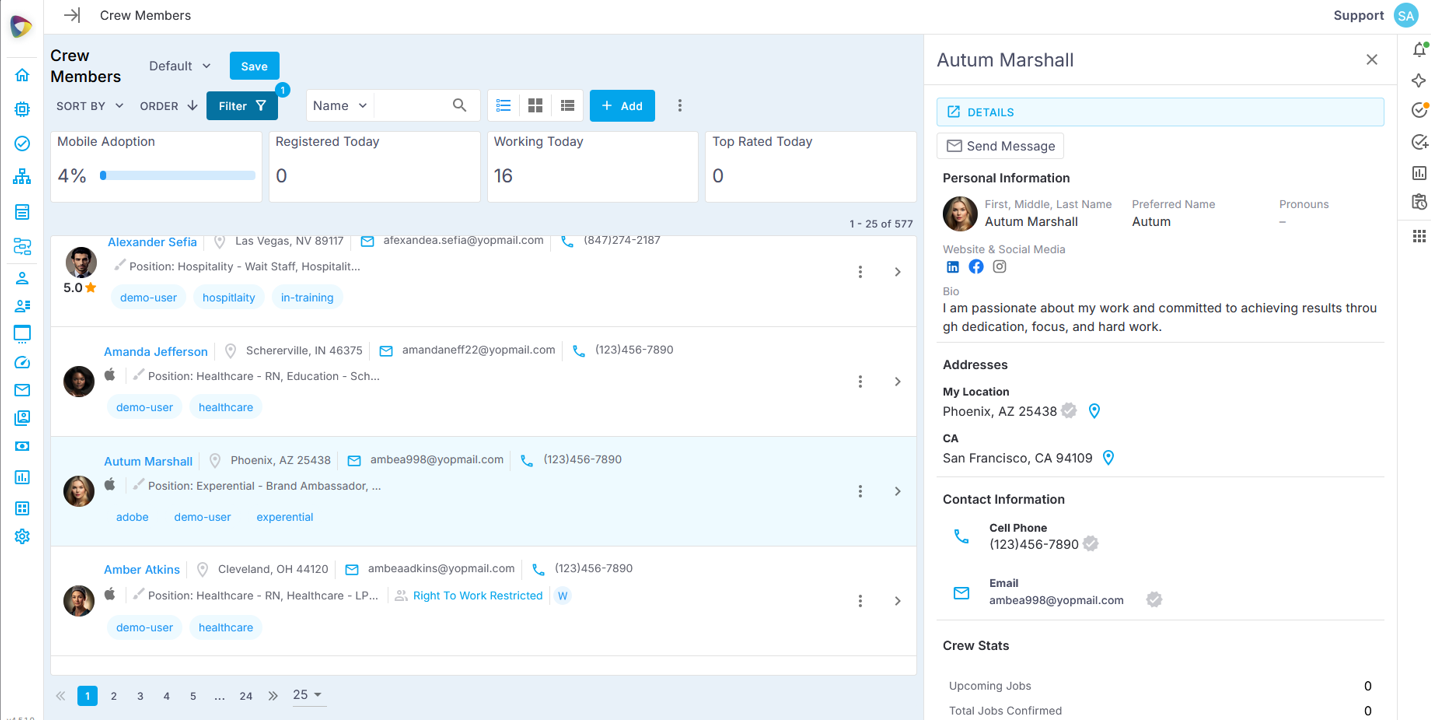
NextCrew staffing ATS showing a list of candidates beside one candidate's profile with contact details, addresses and Crew stats

One record

From application to payroll

AI-read resumes

Parsed straight into the profile

Your number

Two-way texts from your agency's line

WHAT IS A STAFFING ATS?

What is an ATS for staffing agencies?

An applicant tracking system for staffing agencies is recruiting software built for the way agencies hire: continuously, into a pool of candidates who are placed with many clients, again and again. It captures applications, tracks each candidate through screening and onboarding, and keeps them ready to redeploy instead of closing the file after one hire.

A corporate ATS is built for one employer filling one opening at a time. An ATS for recruiting agencies that make permanent placements is built around the search and the submittal. High-volume staffing needs more: search the people you already have before you advertise, follow each candidate through paperwork to their first job, and hand them to scheduling and payroll without anyone re-typing their details.

Most staffing platforms treat the ATS as a separate database. NextCrew built it as the front door of the agency: the candidate record you create at application is the same record you schedule, pay and invoice against.

How a staffing ATS differs from a corporate ATS
  Corporate ATS Staffing ATS
Recruits forOne employerMany clients, often in the same week
After the hireThe file closesThe candidate joins your pool and is placed job after job
First place to lookNew applicants for this openingYour existing pool, then job boards, referrals, walk-ins and job fairs
How candidates applyLong forms, often on a desktopA short application on a phone
What comes nextA hand-off to HROnboarding, scheduling, timesheets and payroll on the same record
WHAT MAKES US DIFFERENT

Recruiting Software for Staffing Firms That Doesn't Stop at the Hire

One record, application to payroll

The candidate who applies today is the Crew Member you schedule, pay and invoice against next week. Skills, credentials, availability and rates live on one record, so nobody re-keys a new hire into a second system.

Your pool is the first place you look

Search everyone who has ever applied by skill, certification, position, location or availability before you pay for another job ad. The candidate who applied six months ago for a different role is often the fastest fill you have.

Built for the phone candidates apply from

A mobile-first application and a shareable registration link put candidates in your system the moment they submit. You decide which fields are required, and automated reminders nudge anyone who hasn't finished their profile.

AI that reads, recruiters who decide

CrewPilot AI parses resumes into the profile, answers plain-language questions about a resume, and searches your pool the way you would describe the person you need. Your recruiters still make every call.

HOW IT WORKS

How a Staffing ATS Works for Everyone in the Chain

Recruiters, candidates and coordinators all touch the same record. Here is what each of them sees, does and gets.

Recruiter

Starts the day on who needs a reply

Sees: every candidate grouped by stage, on a shared view the whole team works from.

Does: moves candidates forward in one click, sends interview invitations from templates, and starts onboarding with a status change.

Gets: a pipeline the team can read at a glance instead of an inbox.

Candidate

Applies and finishes on a phone

Sees: a short application, then jobs with the place, time, hours and pay.

Does: registers, completes their profile and paperwork in the browser with nothing to install, and raises their hand for jobs in the Crew app.

Gets: an agency that answers quickly and never asks for the same thing twice.

Coordinator

Schedules new hires the day they are ready

Sees: Crew Members who are hired, available and qualified for the job, with the client's preferred Crew first.

Does: invites or confirms the right people for an order.

Gets: no hand-off file. When onboarding is complete, the status changes and the new hire is ready to schedule.

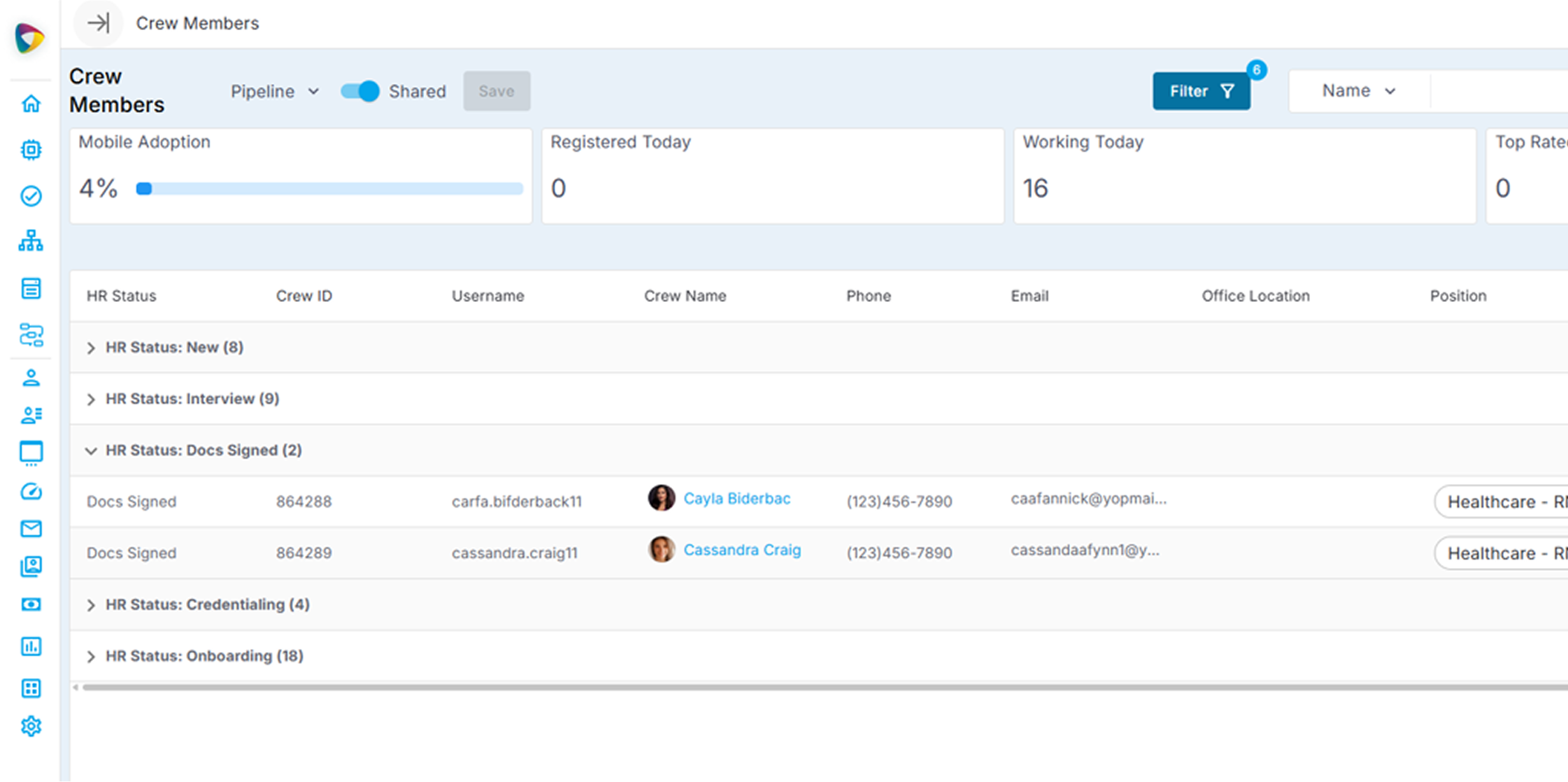
NextCrew Crew Members list in pipeline view, grouped by HR status: New, Interview, Docs Signed, Credentialing and Onboarding
The pipeline view in NextCrew, grouped by stage. Screens from the NextCrew demo environment; names are illustrative.
FUNCTIONS

What Your Recruiters Stop Doing by Hand

Each card starts with the manual way many agencies still recruit, then what the NextCrew staffing ATS does instead.

Walk-ins and job-fair sign-ups typed in from paper

Every way in, one pipeline

Candidates apply through your application or registration link. Recruiters add walk-ins and referrals by hand, and a batch invitation lets a list of people register themselves. Moving from another system? Bulk import brings your existing database in.

Resumes opened, read and re-typed into a profile

AI resume parsing

Drop in a resume and CrewPilot AI pulls out contact details, skills, experience, certifications and work history, and fills in the profile. The resume stays viewable inside the profile, with no download and no second tab.

Candidate status kept in a spreadsheet one person updates

Pipeline stages that match your process

New, Interview, Onboarding, Docs Sign and Hired come standard, and the stages can be configured to match how your agency recruits. Moving a candidate is one click the whole team sees, and shared views per stage give every recruiter the same list.

A new job ad for every order, even when the right people already applied

Pool search and groups

Search the pool by skill, certification, position, location or availability, or describe who you need in plain language. Save the result as a group, such as forklift-certified and ready to work, and invite the whole group to a job at once.

Candidates chased one text at a time from a personal phone

Personalized messages at volume

Send one personalized message to a stage, a certification or a location by email, text or push. Texts go out from your agency's own number and replies come back into the candidate's record. Templated emails cover interview invitations and requests for more information.

Jobs posted board by board, then copied onto the website

Job board and distribution

Publish jobs to the job board built into NextCrew and embed them on your website. Distribute them further through JobTarget, and bring client orders in from a VMS through VMSpark.

WITHOUT VS. WITH

A Recruiting Week, Without and With a Staffing ATS

This week's new applications

Without

Weekend applications sit in three inboxes and a job-board login. By the time someone replies, the best candidates have already started with another agency.

With NextCrew

Every application is already in the New stage with its resume parsed. The team works one shared view and the first replies go out from templates before lunch.

The big weekend order

Without

Recruiting posts fresh ads and waits, while people who worked the same client last season never hear about it.

With NextCrew

The pool is searched first and invited as a group. New ads go out only for the gap that is left.

The candidate who stalls

Without

A promising applicant stops halfway through their profile. Nobody notices for a week, and by then they have moved on.

With NextCrew

An automated reminder nudges them to finish, and the HR Status widget shows how many candidates are waiting in each stage.

From hired to scheduled

Without

A new hire's details are typed again into the schedule and again into payroll, and one of the three copies is wrong.

With NextCrew

When onboarding is complete the status updates, the recruiter is notified, and the Crew Member is ready to schedule, with their rates following them into timesheets and payroll.

CREWPILOT AI

Every Resume Read Before a Recruiter Opens It.

Powered by CrewPilot AI — Recruitment AI

Step 1

A resume arrives

A candidate applies, or a recruiter drops a resume onto a profile.

Step 2

AI reads it

Contact details, skills, experience, certifications and work history are extracted and written to the profile.

Step 3

The recruiter asks

Ask the resume a question in plain language, or search the whole pool the same way: certified forklift operators within ten miles, available weekends.

Step 4

A person decides

The recruiter reviews and moves the candidate forward, or not. AI never makes the hiring call.

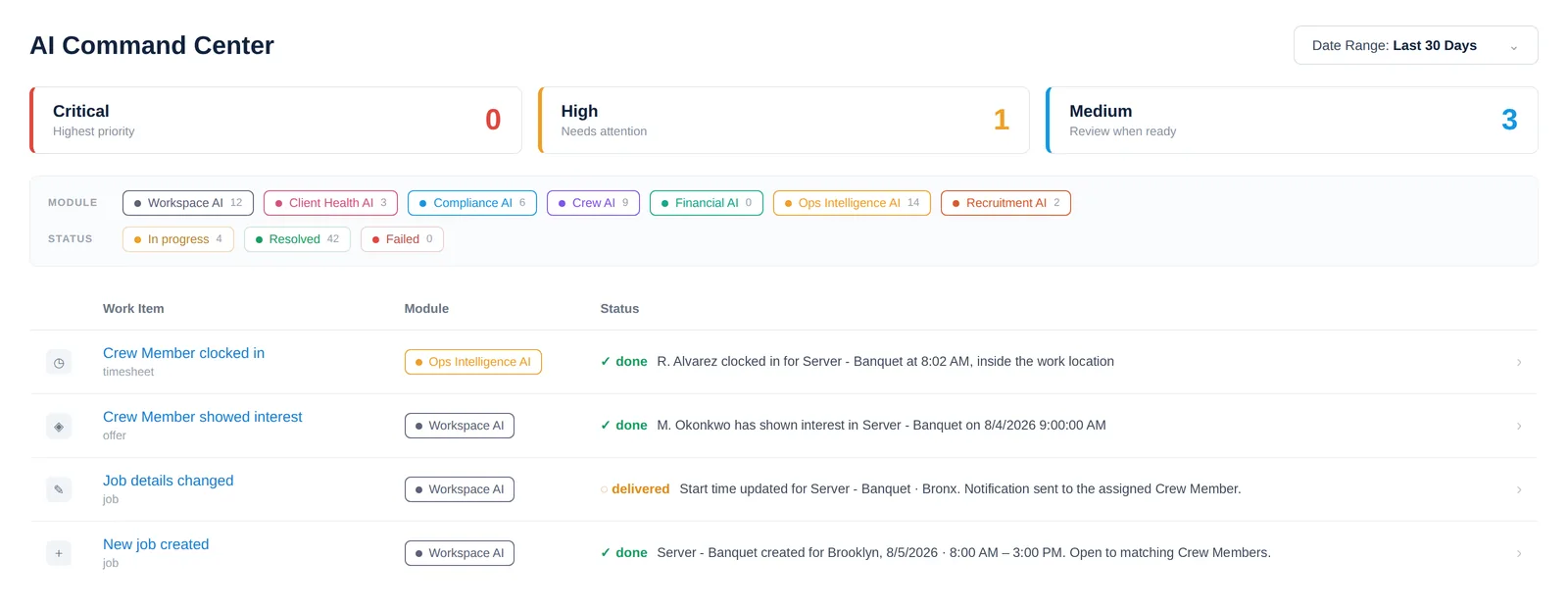
NextCrew AI Command Center showing items by priority, filters by AI module and status, and a log of work items
The AI Command Center surfaces what needs attention across your agency and logs what happened next. It is being enabled account by account. Demo data; names changed.

Recruitment AI is one of the intelligence modules inside CrewPilot AI Command Center, each watching a different layer of your operation, all in one place.

Recruitment AI

Crew AI

Workspace AI

Compliance AI

Ops Intelligence AI

Client Health AI

Financial AI

CONNECTED SOLUTIONS

The ATS Feeds Everything After the Hire

Applicant tracking is not a standalone database in NextCrew. What comes in from clients shapes who you recruit, and every hire flows straight into onboarding and scheduling.

FEEDS IN FROM

Client Orders & CRM

Orders from clients and their portal tell recruiting which positions, certifications and locations to fill next.

Applicant Tracking (ATS)

You are here

FLOWS OUT TO

Onboarding

One status change sends the right document package, pre-filled from the candidate's profile, with reminders until it is complete.

Job Management & Scheduling

Hired, available, qualified Crew Members appear in matching for every job, with their rates ready for timesheets and payroll.

HOW DO YOU KNOW IT'S WORKING?

The Metrics That Tell You Your Recruiting Is Healthy.

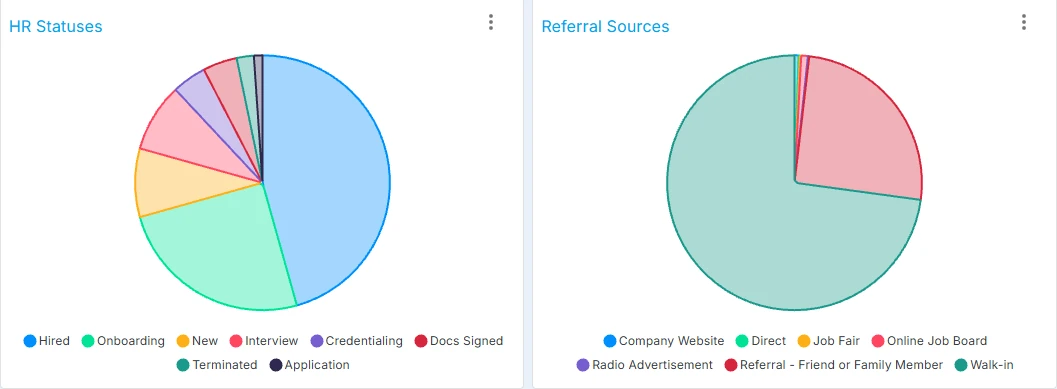
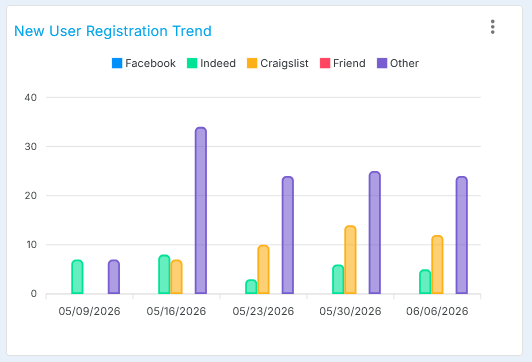
The HR dashboard shows candidates by stage, referral sources and the weekly registration trend as they change. Set your own targets: the right number depends on your verticals and your season.

NextCrew HR dashboard widgets: a pie chart of candidates by HR status and a pie chart of referral sources such as company website, job board, job fair, referral and walk-in
NextCrew New User Registration Trend widget showing weekly registrations by source

Screens from the NextCrew demo environment.

New candidates this week vs. last

Registrations week by week. A falling line is the early warning that your pool is drying up before a busy season.

Source of hire by channel

Which job boards, referrals, walk-ins and job fairs bring candidates who actually get hired, so ad spend follows results.

Time from signup to first contact

How long a new applicant waits to hear from you. Average the hours between registration and the first message or call.

Profile completion rate

The share of registrants who finish their profile. Completed profiles divided by registrations in the period.

Candidates by stage

Headcount in each stage right now. A pile-up in New points to response speed; a pile-up in Docs Sign points to paperwork.

CALCULATOR

What Manual Recruiting Costs You Each Year

Enter your own numbers. Nothing is sent anywhere; the math runs in your browser.

The $19.32 default is the median cost per application at the end of 2025 reported by Appcast (Staffing Industry Analysts, February 2026). Replace it with your own.

Estimated yearly cost

$71,386

Manual entry time plus ad spend on applicants who never hear back.

Recruiter hours a year

1,040

Cost of that time

$31,200

Ad spend on applicants who never hear back

$40,186

How it works: applications × minutes ÷ 60 × 52 weeks gives hours; hours × hourly cost gives the time cost. Applications × share never contacted × cost per application × 52 gives the ad spend. Estimates only.

BUYING A STAFFING ATS

How to Choose an ATS for a Staffing Agency

Choose a staffing ATS by testing it against your busiest recruiting week, not a ten-candidate demo. Bring real resumes, ask to search a pool the size of yours, and follow one candidate all the way from application to their first scheduled job.

Our High-Volume Staffing Software Buyer's Playbook covers the whole evaluation, from requirements to pricing and rollout.

Questions to ask in every demo

  1. Can a candidate finish your application on a phone in a few minutes, and which fields can we make optional?
  2. How fast can we search our existing pool by position, certification, location and availability?
  3. What does the AI do today, on an account like ours, and where does a recruiter approve?
  4. When a candidate is hired, what has to be re-typed before they can be scheduled and paid?
  5. How do onboarding paperwork and background checks start from the candidate record?
  6. Can we import our current candidate database, and what format do you need?
WHAT YOU'RE LOSING

The Cost of Recruiting Without a Staffing ATS

$19.32

Paid for every application

Appcast put the median cost per application at $19.32 at the end of 2025 (reported by Staffing Industry Analysts, February 2026). Every applicant who stalls or never hears back was already paid for.

60%

Quit long applications midway

In a CareerBuilder study reported by SHRM in 2016, 60% of job seekers said they had quit an online application partway through because of its length or complexity.

365%

Lift from a five-minute apply

Appcast's study of 500,000 job seekers, reported by SHRM in 2016, found conversion rates up to 365% higher when an application took five minutes or less.

9.5M

People in temporary and contract staffing in 2025

The American Staffing Association reported 9.5 million people employed in temporary and contract staffing in 2025, about two million a week in the fourth quarter. At that scale, recruiting never stops, and neither should your pipeline.

FAQs

Common Questions About ATS for Staffing Agencies

An ATS for staffing agencies is applicant tracking software built for agencies that recruit continuously and place the same people with many clients. It captures applications, tracks candidates through screening and onboarding, and keeps them in a searchable pool so they can be redeployed job after job. In NextCrew, the ATS is part of one platform that also runs scheduling, timesheets, payroll and invoicing.

A corporate ATS tracks applicants for one employer's openings and closes the file after the hire. A staffing ATS recruits for many clients at once, searches the existing pool before advertising, and hands each hire to scheduling and payroll. That is why recruitment software for staffing agencies has to connect to the rest of the agency instead of stopping at the offer.

Yes. NextCrew's application is mobile-first, and a public registration link can be shared on job boards, your website, email or social media. Candidates are in the system the moment they submit, you choose which fields are required, and automated reminders nudge anyone who hasn't finished their profile.

CrewPilot AI parses resumes into the candidate profile, answers plain-language questions about a resume, and searches your pool by description, such as certified forklift operators within ten miles who are available weekends. Recruiters review the results and make every decision. The AI Command Center, which surfaces what needs attention across the agency, is being enabled account by account.

Yes. Changing a candidate's status to onboarding sends the right document package, pre-filled from their profile, with reminders until it is complete. Background checks are started and tracked from the candidate profile through the Checkr integration.

Yes. Bulk import through Data Exchange brings in an existing candidate database, and data import and cleansing are part of NextCrew's implementation work. Walk-ins and referrals can also be added by hand, and a batch invitation lets a list of people register themselves.

No. NextCrew is staffing and recruiting software in one platform. The candidate record created at application becomes the Crew Member record you schedule, pay and invoice against, so nothing is re-typed between recruiting, scheduling, timesheets and payroll.

An ATS manages candidates; a CRM manages clients, contacts, rates and orders. NextCrew includes both on the same platform, so client orders tell recruiting what to fill, and each client's preferred Crew rise to the top when jobs are filled.
SEE IT WITH YOUR OWN CANDIDATES

From application to first job — in one connected system.

Bring a stack of real resumes and your busiest order. We'll parse them, search your pool, and take one candidate from application through onboarding to a scheduled job, live.

Mobile applications AI resume parsing Pool search and groups Onboarding on the same record