Staffing Invoicing Software. Stop Building Invoices By Hand.
Staffing agency billing software that turns approved timesheets into client-ready invoices in one
batch, with per-client billing rules, attached timesheet
proof, and AR tracking built in.
Most staffing platforms generate a bill and call it done. NextCrew generates a billing cycle.
Staffing invoicing software turns approved timesheets into client-ready invoices without re-entry, applying each client's billing rules, calculating overtime, attaching timesheet proof, and posting the result to accounts receivable. In NextCrew, one click processes every client at once, and the batch exports AP-ready for QuickBooks. Your back office stops spending half a day on invoicing and spends fifteen minutes on it.
WHAT MAKES US DIFFERENT
Staffing Agency Billing Software Built For High Volume, Not Retrofitted From Generic Invoicing Tools.
Generic invoicing tools handle one client format. Staffing agencies need fifty, and need them all to run at once, with the right OT rules, the right groupings, and signed timesheet proof attached.
Per-client billing rules, configured once
Grouping (by order, pay week, or parent account), OT and holiday display, line-item structure: set per client, applied automatically every cycle. The more clients with unique requirements, the more time the automation saves.
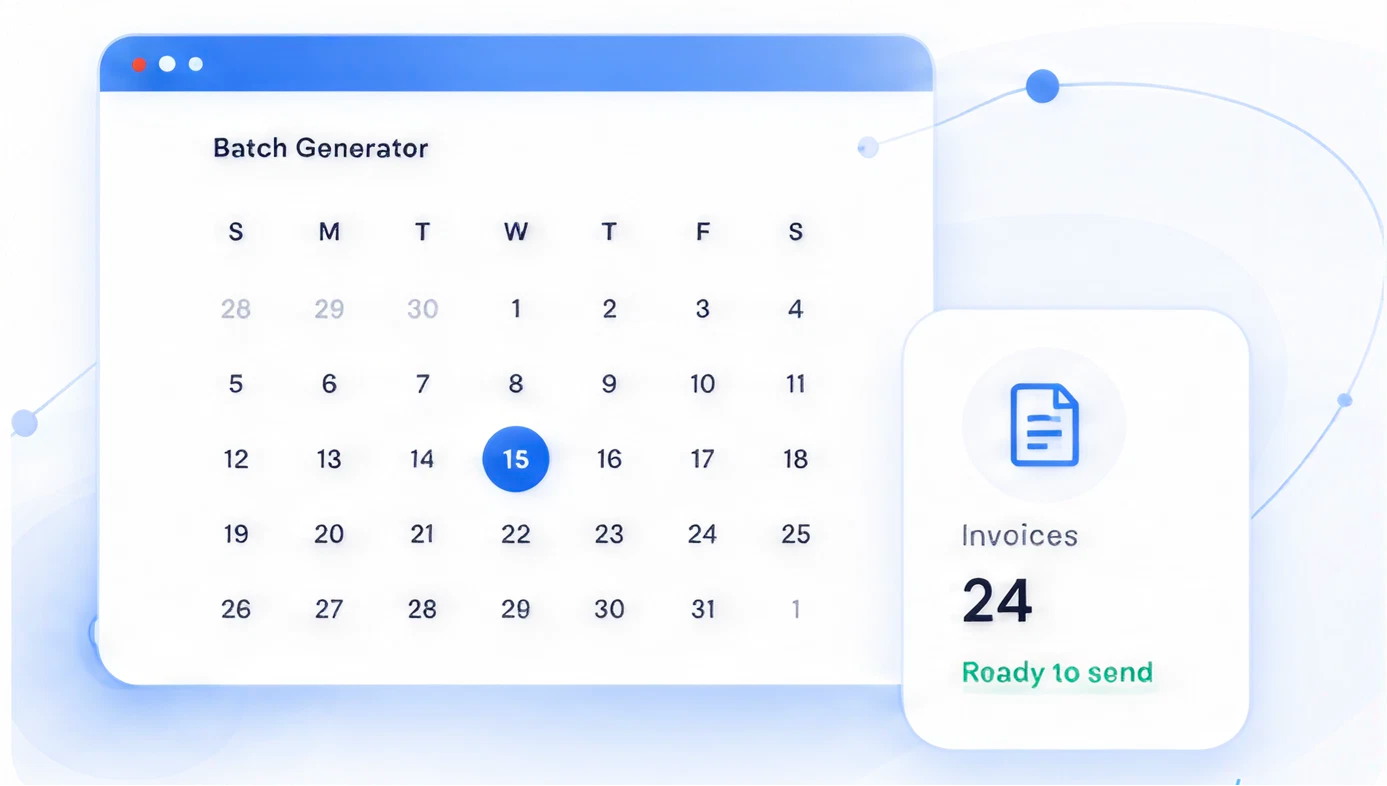
Batch generation: every client, one action
Run your entire week's billing cycle in one batch. Fourteen clients, eighty clients, doesn't matter. Coordinator runs it, reviews exceptions, and sends. Most billing cycles close in under fifteen minutes.
Signed timesheets attached to every invoice line
Crew Member timesheet images attach automatically. Clients see exactly who worked, when, and what was approved, in the portal, before they pay. Disputes drop before they start because the proof is already there.
Financial AI catches drift before cash flow does
Each client's payment pattern gets watched against their own baseline. When clients start paying slower than they normally do, your finance team gets a structured alert, not a month-end surprise.
HOW IT WORKS
How Staffing Invoicing Works In NextCrew: One Billing Cycle, Three Experiences.
Back-office runs invoices. Clients view, drill in, and pay. Finance sees AR and margin live. All from the same approved timesheets.
BACK-OFFICE COORDINATOR
From approved timesheets to sent invoices in one action
At cycle close, the coordinator opens the batch generator, selects the period, and runs it. Client-specific formats, OT rules, and groupings apply automatically.
Batch generator populated from approved timesheets
Signed timesheet images attached automatically
Mass-send to all clients, or review and send individually
Client
View, drill into Crew Member detail, and pay, without PDFs in email
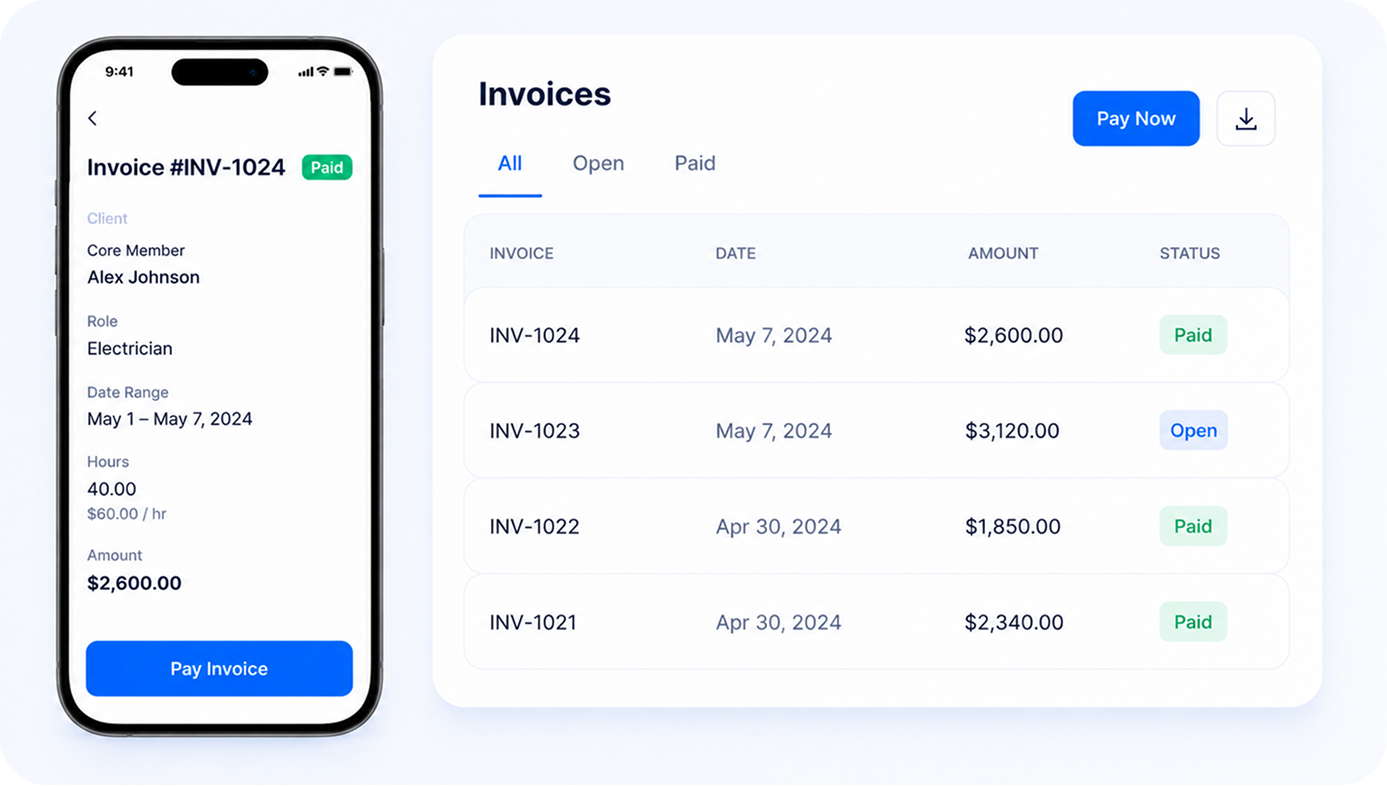
Invoices land in the client portal with all line items and supporting timesheets. Clients review on web or mobile, drill into specific Crew Members, and pay online if the processor is enabled.
Line-item-level Crew Member timesheet detail
PDF download for AP records
One-tap approval and online payment
Finance / owner
Real-time AR visibility and clean accounting exports
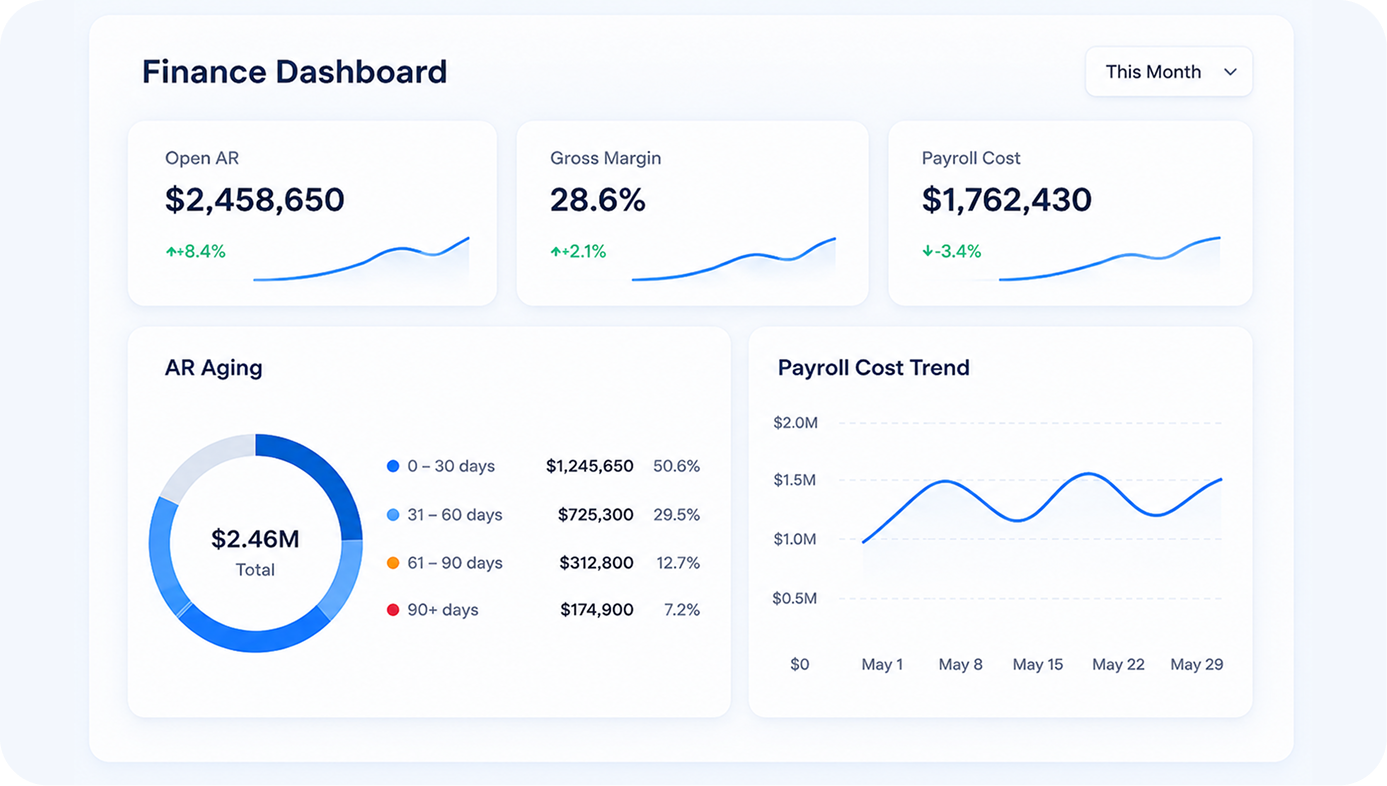
Every open balance, aging bucket, and payment shows live in the finance dashboard. Owners see gross margin by client and weekly payroll cost trends as invoices close.
AR aging by client, refreshed real-time
One-click export to QuickBooks or Xero
Estimates and deposit invoices for events
FUNCTIONS
The Capabilities That Turn Staffing Invoicing From A Half-Day Event Into Fifteen Minutes.
Each capability solves something most staffing agencies do manually today, and most invoicing tools can't do at all because they were built for a single billing format, not fifty.
Every client wants a different format, configured weekly
Configurable billing rules per client
Grouping (by order, pay week, or parent account), OT and holiday display, line-item structure, and contact routing: set once at the client level. NextCrew applies the rules on every invoice from that client forward, automatically.
Events clients want a deposit before Crew deploys
Estimates, deposits, and parent rollup
Generate estimate invoices before work begins to collect deposits. Standard practice for events and hospitality. Roll multiple locations up to a parent billing contact automatically. Convert estimates to finals when the job closes.
Clients dispute charges because they can't see who worked
Signed timesheet attachments per invoice line
Crew Member timesheet images attach directly to each invoice line. Clients see exactly who worked, when, and what was approved, in the portal, before they pay. Disputes drop because the supporting proof is already there.
AR status lives in an inbox until the accountant asks
Real-time AR dashboard with aging
Every open balance, aging bucket, and payment shows live, by client, by age, by amount. Finance teams stop emailing the coordinator for status and start looking at the dashboard. AR follow-up gets faster because the data is already there.
Manual QuickBooks reconciliation eats hours per cycle
One-click export to QuickBooks and Xero
Approved invoices export to your accounting system in the format your accountant expects: line items, client codes, GL mappings preserved. No rekeying, no reformatting, no reconciliation gymnastics.
Margin by client only shows up at month-end
Live margin and revenue visibility per client
Gross margin by client, weekly payroll cost trend, and Crew Members per cycle, all visible in the owner dashboard as timesheets approve and invoices close. Real-time, not at month-end. Owners stop asking the coordinator and start acting on the data.
A BILLING CYCLE IN THE LIFE
What Your Back Office's Billing Cycle Looks Like Today, And What It Could.
Without NextCrew
With NextCrew
Without NextCrew
Owner asks "what's our margin on Apex this month?" and the coordinator digs through spreadsheets for twenty minutes before answering.
With NextCrew
Gross margin by client is on the financial dashboard, updated in real time as invoices close. Nobody has to ask, dig, or wait for month-end.
Payroll costs are only visible after the accountant runs the month-end report. You're flying blind on cash for three weeks at a time.
Weekly payroll cost trend is visible in NextCrew, before the month closes, before the accountant runs anything. Cash decisions happen in time to matter.
The events team can't collect a deposit until someone manually creates an invoice in QuickBooks and emails a PDF. Some clients don't pay until the work is done.
Generate an estimate invoice in the platform, share it through the client portal, collect the deposit, before a single job is filled. Standard practice for events agencies.
"What's outstanding this week?" gets answered by digging through email and pinging the coordinator. Finance reviews are interruption-driven, not data-driven.
AR dashboard shows every open balance, aging bucket, and payment by client in real time. Finance reviews start from the dashboard, not from a question.
Exporting to QuickBooks is a 45-minute manual reconciliation involving spreadsheets, reformatting, and at least one billing error nobody catches until the client does.
One-click export to QuickBooks or Xero in the format your accountant expects. Line items, client codes, and GL mappings preserved. Imports without rekeying.
A client starts paying ten days slower than usual. Nobody catches it because there's no per-client payment baseline. By the time it shows up in DSO, six clients are doing it.
Financial AI watches each client's payment pattern against their own baseline. The moment six clients start drifting, finance gets a structured alert with the combined exposure number.
CREWPILOT AI
From Billing Gap To Follow-Up Action. Before Anything Is Overdue.
Powered by CrewPilot AI: Financial AI
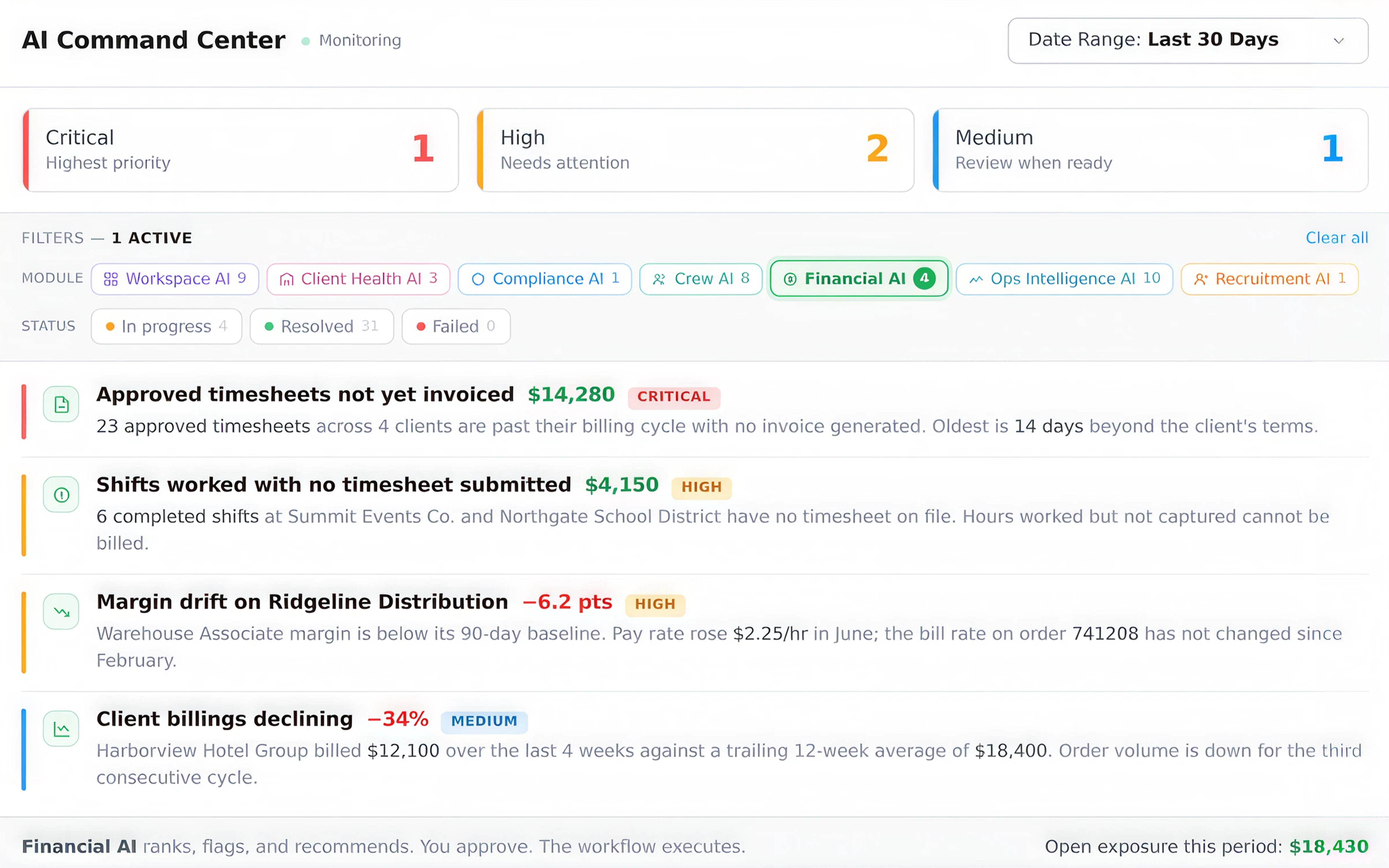
Most billing loss is not a late payment. It is revenue that never made it onto an invoice. Financial AI watches approved timesheets, missing submissions, rate consistency, and client billing volume continuously, measures each against that client's own history, and puts a dollar figure on what is sitting unbilled. Every finding lands in one queue, ranked by what it costs you.
Step 1
Watch
Approved timesheets, missing submissions, pay and bill rate changes, invoice history, and payment timing flow into Financial AI continuously, from timesheets, invoicing, CRM, and AR.
Step 2
Compare
Each signal is measured against that client's own baseline, not an industry average. Unbilled hours, margin drift, and billing decline each get a dollar figure attached.
Step 3
Rank
Findings land in AI Command Center as work items sorted Critical, High, Medium, by exposure, not by date. The biggest gap is the first thing you see.
Step 4
Approve
You decide what happens: generate the invoice batch, send the timesheet reminder, open the rate review. The workflow executes your decision and logs it to the audit trail.
Financial AI is one of the CrewPilot AI agents, each watching a different part of your operation, all visible in one place.
Recruitment AI
Crew AI
Workspace AI
Compliance AI
Ops Intelligence AI
Client Health AI
Financial AI
The AI Command Center is live for every NextCrew account. It is already in your workspace, with no action needed on your end.
What Agencies Say About Running Invoices In NextCrew
From healthcare per-diem to events deposits, billing cycles that used to take a half-day, run in under an hour.
Invoice day used to be a half-day event every billing cycle. Now I run the batch, review for ten minutes, and it's done. Every client gets their own format without me touching anything.
VL
Volkan Logoglu
CEO, Totally Temps
40.6 days
Average DSO across large U.S. companies in 2021, and rising. Every day above that average is working capital tied up in unbilled or aging receivables.
Hackett Group Working Capital Scorecard, 2022
20-35%
DSO improvement typical for agencies adopting AR automation, through faster invoicing, automated follow-up, and pattern-based exception handling.
Credit Pulse DSO-by-Industry Benchmarks, 2025
HOW DO YOU KNOW IT'S WORKING?
The Metrics That Tell You Your Invoicing Engine Is Healthy.
NextCrew surfaces these in real time. No report needed. Targets reflect industry benchmarks for B2B services and AR-mature staffing operations.
Invoicing & AR Health: Last 90 days
90 days
LIVE
TOTAL BILLED
$284K
↑6% vs last week
AVG DSO (DAYS)
31
↑ Improved
GROSS MARGIN
24.2%
↓ Needs attention
Cycle time
12m
12m
AR current (0-30)
83%
83%
Average DSO
31d
31d
Dispute rate
2.1%
2.1%
Margin drift
-1.4pt
-1.4pt
View full dashboard →
Invoice cycle time
Minutes from "approved timesheets ready" to "all invoices sent." The smaller, the faster cash starts moving, and the less coordinator time it consumes.
NextCrew target: under 15 minutes · with batch generation
AR current ratio (0-30 days)
Share of total AR sitting in the 0-30 day bucket. The earliest indicator of overall collections health, before DSO moves.
Healthy: 80%+ current · per Credit Pulse AR aging benchmarks
Days Sales Outstanding (DSO)
Average days between invoice sent and payment received. Tracks how fast clients actually pay, not how fast they're billed.
Healthy: 30-40 days · per Hackett Group Working Capital Scorecard
Invoice dispute rate
Percentage of invoices disputed or short-paid in a cycle. Disputes drop sharply when signed timesheets are attached and client-specific rules are pre-applied.
NextCrew target: under 2% of invoices · with attached timesheet proof
Gross margin per client
Bill rate minus loaded labor cost, tracked per client over time. Margin drift is the earliest signal that a client rate review is overdue.
Industry average ~25% gross · per SIA temp staffing margin research
Industry benchmarks compiled from Hackett Group Working Capital Scorecard (2022), Credit Pulse DSO-by-Industry Benchmarks (2025), APQC Accounts Receivable Open Standards Benchmarking, and Staffing Industry Analysts gross margin & bill rate research. Cycle-time and dispute-rate figures are NextCrew targets, not third-party benchmarks. Dashboard widget shows representative data, not a customer screenshot.
ROI CALCULATOR
How Much Is Slow Invoicing Actually Costing You?
Adjust the inputs to match your agency. The output is a transparent calculation, not a projection.
20
5
100
$8,000
$1,000
$50,000
5 days
1 day
14 days
$35
$25
$65
5
1
20
Coordinator time cost per year
$9,100
Working capital tied up in invoicing lag
$114K
Time saved per year with batch generation
208 hrs
Time cost = hrs/cycle × $/hr × 52. Working capital tied up = annual billings × (delay days ÷ 365). Assumes ~80% reduction in invoicing time with batch generation. DSO impact varies by payment terms.
WHAT YOU'RE LOSING
Every Week Without Automated Invoicing Is A Week Your Cash Flow Is Working Against You.
These aren't projections. Each one is either a transparent calculation you can check, or a published industry benchmark with its source named.
Transparent calculation
$5,460
Per coordinator, per year, on manual invoicing
3 hrs/cycle × $35/hr fully-loaded × 52 weeks = $5,460 per coordinator. Change any of the three inputs in the calculator above and the number changes with them. Multiply by your back-office headcount.
Published benchmark
40.6 days
Average DSO, and AR-mature agencies beat it by ten
The Hackett Group's 2022 Working Capital Scorecard puts average DSO across large U.S. companies at 40.6 days. AR-mature agencies operate at 30 days or less. The gap is cash sitting in your client's account instead of yours.
Operating cost
Cash flow decisions made after the fact
When payroll costs and margin only show up after the accountant runs month-end, you're operating without visibility for most of every month. Decisions get reactive. Margin slips before anyone sees it slipping.
The agencies winning aren't billing more clients. They're closing the cycle faster on the ones they already have.
When timesheets are approved, NextCrew automatically generates draft invoices using each client's pre-configured format: grouping rules, OT calculation, pay period, and rate structure all applied. You review, send via batch or individually, and the data flows to your accounting system. Most billing cycles close in under fifteen minutes regardless of client count.
Yes, this is one of NextCrew's core strengths for staffing. You configure billing rules per client: grouping by job order, pay week, or parent account; OT and holiday display; line-item structure; contact routing. Once configured, those rules apply automatically to every invoice for that client, every cycle, without manual adjustment.
Most of our customers run QuickBooks for accounting, by design. NextCrew handles invoice origination (formatting, calculation, client-specific rules, timesheet attachment) and exports clean data to QuickBooks for your accountant to track. It's a one-click export that imports without rekeying.
NextCrew exports invoice data to QuickBooks and Xero in the format your accountant expects: line items, client codes and GL mappings preserved. Zapier connections are available for custom workflows and additional destinations.
Yes. Many high-volume agencies factor their receivables to cover weekly payroll while clients pay on net terms. NextCrew produces factoring-ready invoices, cleanly formatted with signed timesheet proof attached to every line, which is the backup a factor needs to verify and advance funds. You export each invoice with its documentation and forward it to your factor, with far less back-and-forth over missing verification. NextCrew generates and documents the invoice; submitting it to your factoring company stays in your hands.
Yes. Clients access invoices through the NextCrew client portal where they view line items, drill into Crew Member–level timesheet detail, download PDFs for AP records, and pay online if you've enabled Stripe or another payment processor. This removes the PDF-via-email cycle and gives clients a professional, branded experience per invoice.
Yes. NextCrew supports estimate invoices: create a projected invoice before a job is filled, share it through the client portal, and collect a deposit. When work completes, convert the estimate to a final invoice. Standard practice for event staffing and hospitality agencies that need payment commitments before deploying Crew.
NextCrew supports parent-account invoice rollup: configure the relationship once and invoices from multiple locations or subsidiaries aggregate correctly to the parent billing contact. This matters most for multi-location clients in healthcare and hospitality staffing, where work happens at the location level but billing routes to a central AP team.
This is exactly the scenario NextCrew is built for. High-volume agencies with 20, 50, or 100+ client billing configurations use NextCrew to manage per-client rules at scale, without building a manual workaround for each one. The more clients you have with unique requirements, the more time the automation saves per cycle.
It should bill from the same hours you pay from. Look for five things: invoices built directly from client-approved timesheets, with no re-keying; bill rates set by client, position and job, including differentials and overtime; per-client billing rules for grouping and format, including a consolidated invoice for clients who want one bill across sites; batch runs, so every client is invoiced in one pass; and accounts receivable aging, so you see who is paying late before cash gets tight. NextCrew builds invoices from approved timesheets in batches with per-client billing rules, and includes AR aging and outstanding-invoice reports.
SEE IT ON YOUR OWN BILLING
From approved timesheet to paid invoice, in one connected system.
See how agencies are closing their billing cycle in minutes (batch generation, client-specific formats, live AR tracking, and Financial AI) in a live demo of your specific complexity.