

BLOG POST
How to Efficiently Manage Workers Timesheets?
Managing timesheets across many Crew Members, sites, and clients is where the hours slip. A practical look at streamlining the whole process.
Read the guideCrew Members clock in with GPS geo-fencing. Clients approve with geo-proof. Streamline payroll and automate invoicing — without duplicate entry.
0 re-entry
Clock-in to payroll
to invoice
GPS verified
Every clock-in,
every shift
Real-time
Exceptions
before payroll
NextCrew makes sure you pay on time and get paid correctly — every single time. Each one below is a workflow that used to eat your coordinator's week, and now runs in the system.
Whether your Crew clocks in on mobile, a job site kiosk, or offline at a remote location — every hour flows into the same system. No duplicate entry into payroll. No re-keying into invoicing. Paychex, QuickBooks, and Everee connect directly.
GPS geo-fencing verifies every Crew Member is on-site before they can clock in. Buddy punching, early clock-ins, and disputed hours become a thing of the past — protecting your margins and your client relationships at the same time.
Give clients a portal to review hours, see geo-location proof, and approve or dispute timesheets in real time — from mobile or web. No emails. No PDF sign-offs. No delays between approval and invoice generation.
Most time-tracking tools assume one employer and one pay rate. Staffing doesn't work that way. NextCrew holds a different bill rate for every client, a different pay rate for every Crew Member and role, and different OT rules per assignment — then applies the right combination to every timesheet automatically. The rate complexity that breaks single- employer time clocks is the default here.
From clock-in to client approval to payroll export — every role gets exactly what they need, without the back-and-forth.
Crew Members clock in from their phone with GPS verification, or at a job site kiosk if no personal device is available. No signal? Clock in offline — hours sync automatically when connectivity restores. Crew Members called directly by a client can initiate their own clock-in without coordinator intervention.
A simple, frictionless experience that works in any environment — and a clear record of every hour worked.
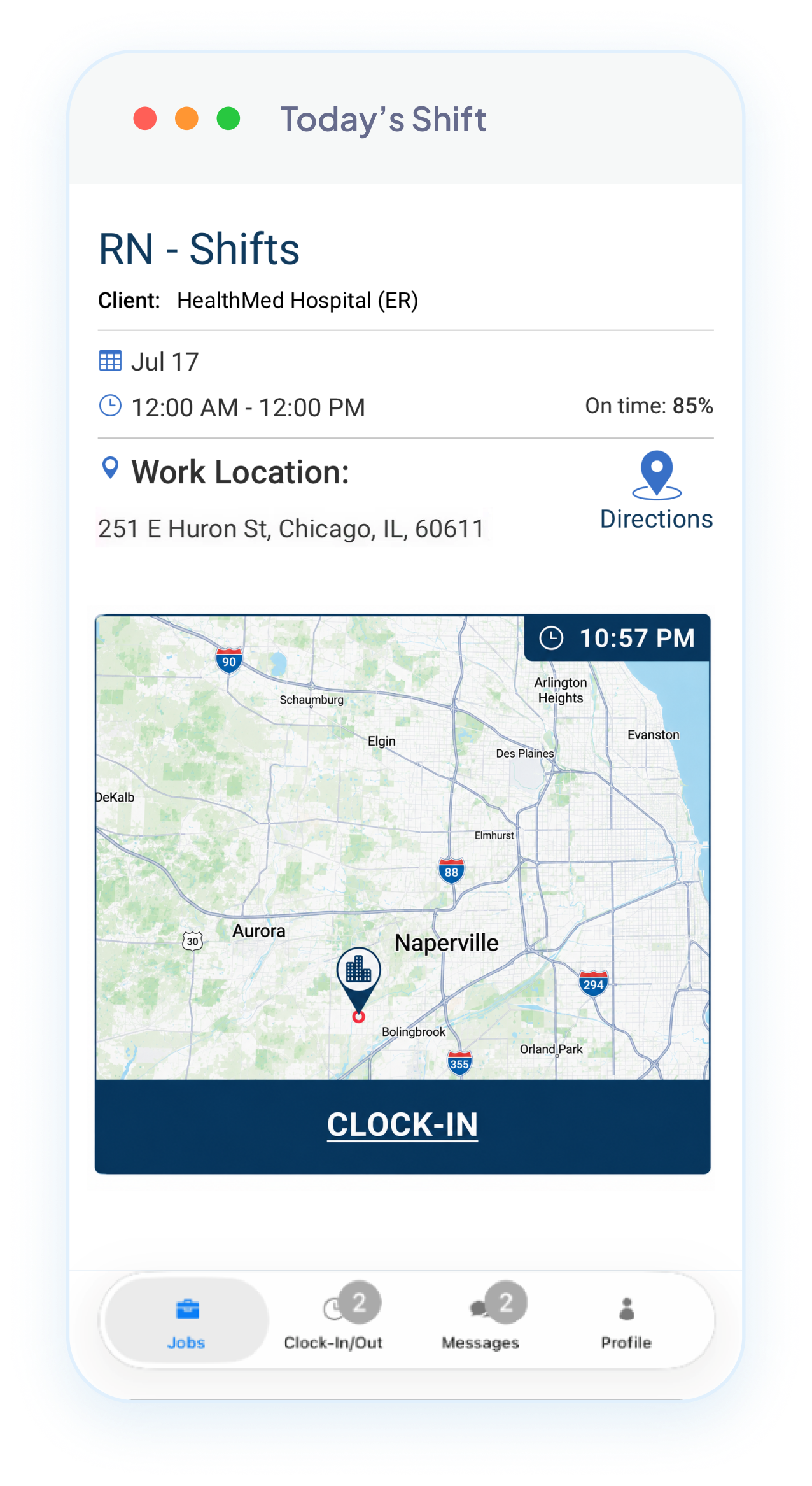
Coordinators monitor clock-ins, OT alerts, and exceptions across all active jobs in real time. Rates and OT are calculated automatically. Once approved, timesheets flow directly to payroll and invoicing — no re-entry. Every exception is surfaced before it becomes a problem.
A pay cycle that closes without a single spreadsheet or coordinator chasing hours.
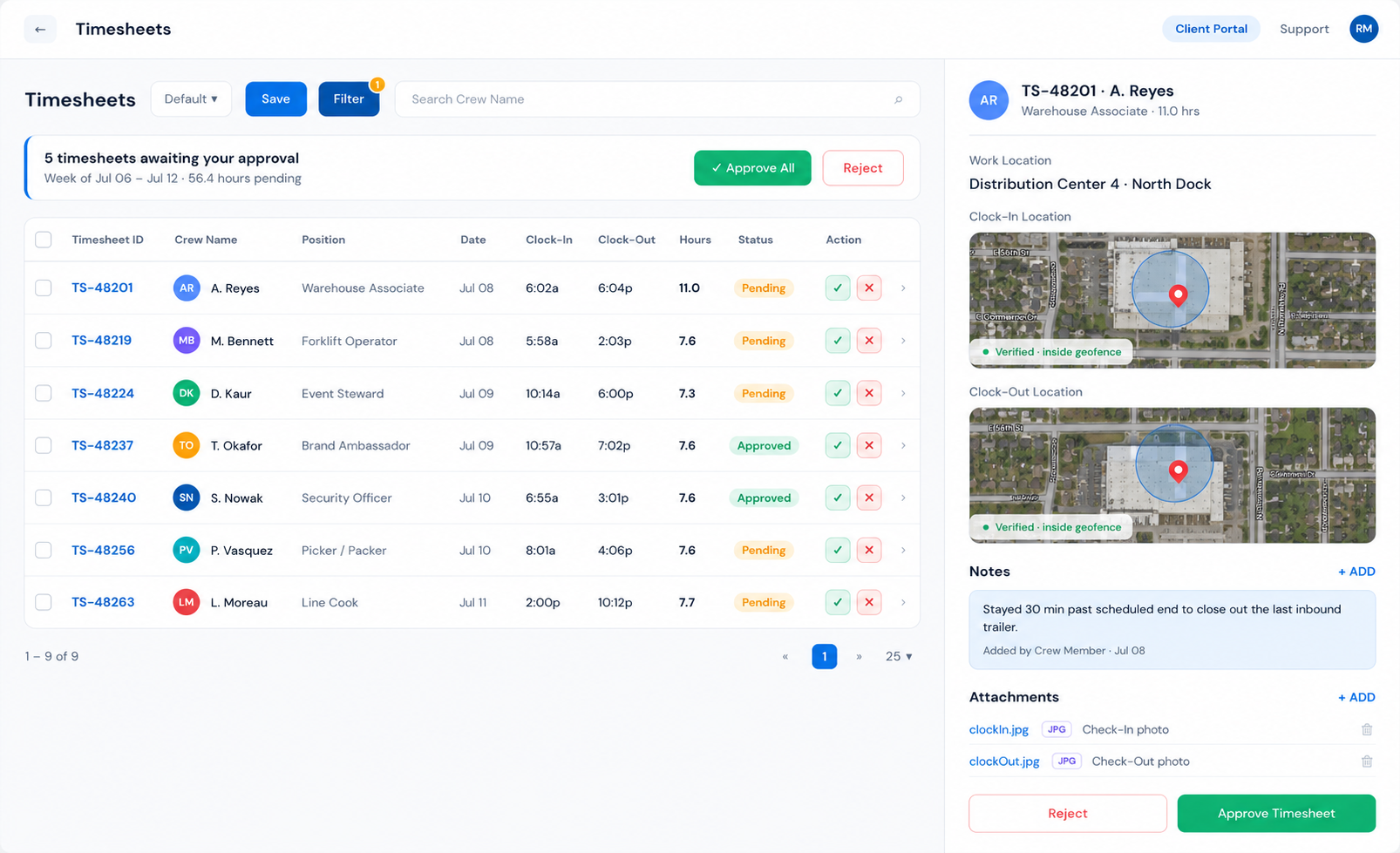
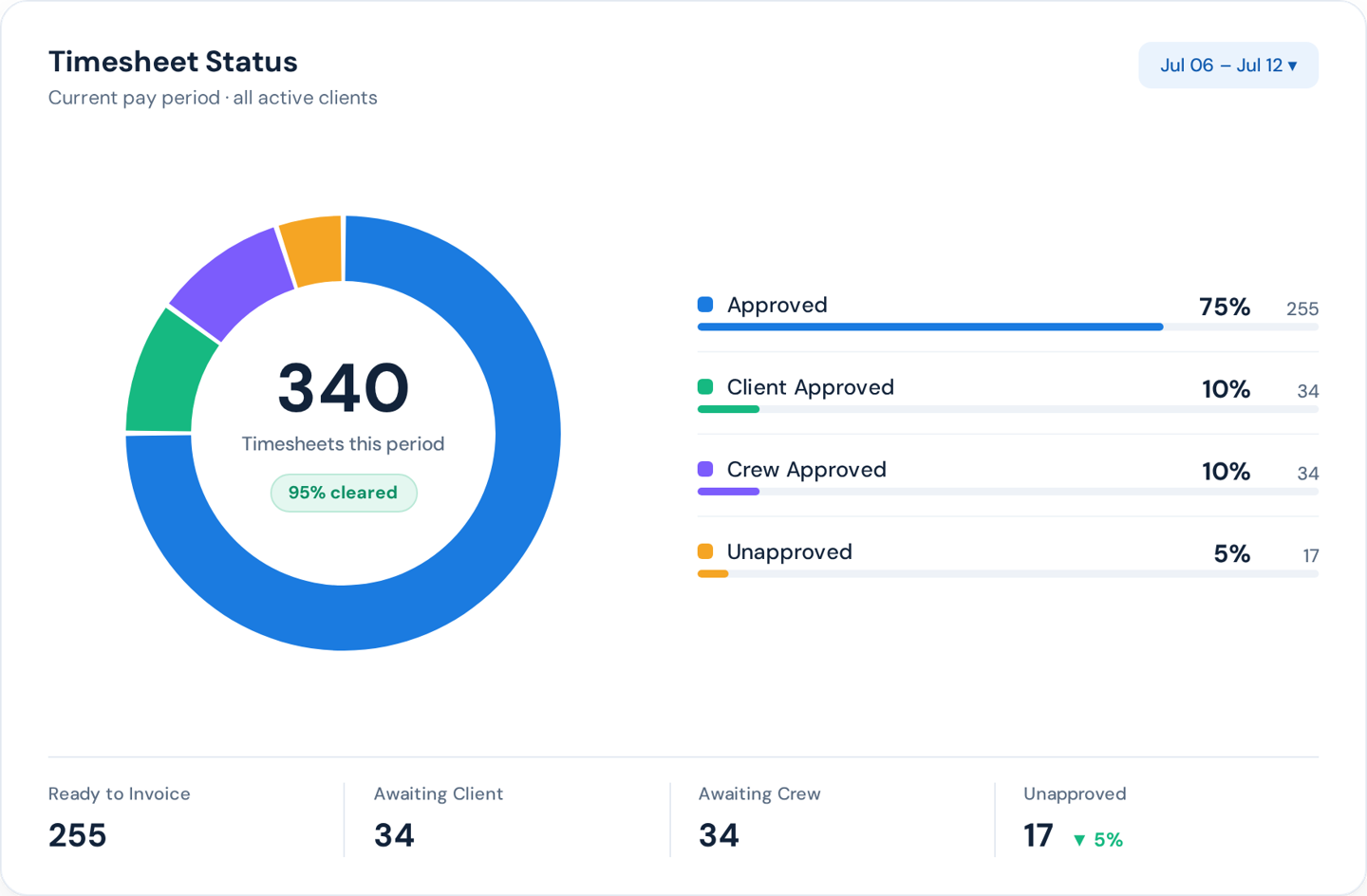
Clients see submitted timesheets, the geo-location of where each Crew Member clocked in, and approve or flag exceptions — all without calling or emailing the agency. Every approval is timestamped. Disputes don't happen - and if they do, the proof is already in the system.
Clients can rate Crew Member at the moment of approval — feeding directly into Crew Member performance records.
Each card leads with what breaks today — and what changes when the system handles it.
Problem
Crew Members say they're on-site when they're not — or can't clock in at all because there's no signal or device
Solution
GPS Geo-Fencing + Offline Clock-In + Kiosk Mode
Crew Members clock in only within a defined boundary. No signal? Offline clock-in syncs when connectivity restores. No device? A shared kiosk handles the whole site.
Problem
A Crew Member arrives without their phone or forgets to clock in — coordinator gets a call, hours go untracked
Solution
Supervisor Clock-In via App
Supervisors clock Crew Members in and out directly from their own app. Every hour still captured, every shift still accounted for — without calling the coordinator.
Problem
Crew Members forget to show up or forget to clock in — coordinators find out when the client calls
Solution
Automated Shift Reminders
NextCrew sends reminders before every shift and flags anyone who hasn't clocked in — so your team knows before the client calls. No manual texts, no phone trees. See how →
Problem
Timesheets get approved, then expenses arrive by email days later — reopening closed records, delaying invoices
Solution
Expense Reimbursement + Attachment Upload
Crew Members submit expenses, receipts, and attachments directly inside the timesheet before submission. Everything reviewed and approved in one pass — nothing reopened, nothing delayed.
Not abstract process improvements. Real scenarios, every shift, every pay cycle.
OT calculations and rate reconciliation
WITHOUT NEXTCREW
Your coordinator manually texts Crew Members to confirm hours, cross-references paper timesheets against the schedule, and calculates OT by hand — before payroll can even start. This happens after every single job.
WITH NEXTCREW
Rates, bill rates, and OT are calculated automatically the moment a timesheet is submitted. Payroll starts from a number everyone already agreed on.
Crew Member called directly by the client
WITHOUT NEXTCREW
A client calls one of your Crew Members directly and asks them to come in. The Crew Member shows up, works the shift — and nobody at the agency knows it happened until the client asks why it wasn't invoiced.
WITH NEXTCREW
Crew Members initiate their own clock-in when called directly by a client. Every hour is captured, routed through the approval workflow, and invoiced — with zero coordinator intervention.
Payroll and invoicing double entry
WITHOUT NEXTCREW
Approved timesheets get exported to a spreadsheet, re-keyed into your payroll system, then re-keyed again into your invoicing tool. Two hours of back-office work per pay cycle, per coordinator.
WITH NEXTCREW
Approved timesheets flow directly into Paychex, QuickBooks, or Everee. Invoices generate from the same approved data. One click. No duplicate entry.
Client disputes an invoice
WITHOUT NEXTCREW
Your client calls to dispute an invoice because they don't remember approving those hours — and you have no proof of where the Crew Member was when they clocked in.
WITH NEXTCREW
Clients approve timesheets in their portal with geo-location proof attached. Every approval is timestamped. Disputes don't happen — and if they do, you win them.
Powered by CrewPilot AI — Financial AI
DUPLICATED OR OVERLAPPING HOURS
The same Crew Member's time gets counted twice.
A duplicate timesheet, or two shifts that overlap on the same day. CrewPilot flags both and holds them before approval.
Rate doesn't match the record
A timesheet's rate doesn't match what's on file.
The pay or bill rate on a sheet differs from the rate set for that Crew Member, position, or client. CrewPilot flags the mismatch before the sheet is approved.
Missing timesheets
A sheet is unsubmitted or unapproved at cutoff.
As the pay deadline nears, some hours still aren't submitted or approved. CrewPilot surfaces exactly which ones, and whose.
CrewPilot flags and holds. Your team decides. The AI never changes a timesheet on its own — every correction is made by a person, so you stay in control of every hour that gets paid and billed.
Financial AI is one of the intelligence modules inside the CrewPilot AI Command Center — together they form the full intelligence layer of your platform.
Recruitment AI
Crew AI
Workspace AI
Compliance AI
Ops Intelligence AI
Client Health AI
Financial AI
From the first reminder to the No-Show Report, the whole routine runs in one place.
Before the job
Reminders go out on their own.
A notice at assignment, a 24-hour reminder and a clock-in reminder before the start go out by email and app notification, and by text once the Twilio integration is turned on. Crew acknowledge the job in the app when they confirm it.
At start time
Daily Pulse shows who's missing.
Late clock-ins and no-shows appear on today's timesheets at the thresholds you set, and the user assigned to the job gets an email 15 minutes after start.
When someone's missing
Message, clock in or backfill from one screen.
Message every no-show at once, clock in a Crew Member who's on site but couldn't clock in, and backfill from the job's Invite screen.
The record
Every no-show is logged the same way.
Mark the timesheet Not Completed and add a violation for that client. It shows on the Crew Member's profile and in the No-Show Report, whoever was on duty that morning.
Your client
Clients see live check-in status.
In the client portal, the Daily Pulse widget on your client's Home dashboard shows each Crew Member's check-in status, live, so they aren't the first to find an empty station.
The numbers
The No-Show Report shows the pattern.
No-shows across Crew and clients, built from the same records, ready for your weekly review.
NextCrew reminds, flags and records. Your coordinators decide who works, who gets a second chance and what the client hears.
A time clock app with geofencing checks where a Crew Member is when they clock in, not just when. In NextCrew, every job site gets a geofence, with a radius you set per client, order or job, and the Crew app records GPS coordinates and a photo at every clock-in and clock-out. A clock-in or clock-out from outside the radius is blocked, and a radius of 0 turns the check off for sites where a geofence doesn't fit. Your team and your client see proof of attendance, not a time someone typed in.
A geofence time clock is the practical answer to buddy punching and to clock-ins made from somewhere other than the job. Not every site suits a phone, so the same timesheet also takes kiosk and supervisor clock-ins. New to the term? Read what geofencing means for staffing agencies.
Jobs flow in. Rates flow in. Approved hours flow out to payroll and invoicing. Every module connected — no data re-entered anywhere.
UPSTREAM — FEEDS INTO TIMESHEETS
CRM
Client bill rates and Crew Member pay rates stored in CRM auto-populate into every timesheet. Rates are always correct before the first clock-in.
Job Management & Scheduling
Shift details, assigned Crew Members, start/end times, and job site locations flow directly into the timesheet. The schedule is the timesheet's starting point.
Timesheet Management
You are here
DOWNSTREAM — TIMESHEETS FEED INTO
Payroll
Approved timesheets flow directly into payroll — hours, rates, OT, and contractor vs. employee classification already calculated. Payroll runs from clean data.
Accounting & Invoicing
The same approved timesheet data that feeds payroll generates the client invoice. No duplicate entry, no discrepancy between what you paid and what you billed.
Approved timesheet data flows into these systems automatically. No manual export. No re-keying.
PAYROLL INTEGRATION PARTNERS

Run payroll directly from approved NextCrew timesheets — hours, rates, OT, and classifications flow straight into Paychex without re-entry. For agencies already on Paychex, there's nothing to rebuild.
Payroll Integration

Approved timesheet data syncs to QuickBooks for payroll processing and financial reconciliation. One source of truth from clock-in to books closed — no spreadsheet in between.
Payroll + accounting

Pay Crew Members faster with Everee's flexible pay experience — connected directly to NextCrew timesheets. Approved hours trigger payment automatically, with no manual export required.
Payroll Integration
EARNED WAGE ACCESS PARTNERS

Give Crew Members on-demand access to earned wages the moment their timesheet is approved. Crew Members don't wait for payday — and you don't lose them to agencies that offer it.
Earned wage access

Offer earned wage access as a retention tool — without changing your payroll schedule. Immediate pulls directly from approved NextCrew timesheets so Crew Members can access what they've earned, when they need it.
Earned wage access
"There are many systems out there, but none that support high volume orders, which is where our sweet spot is. I think NextCrew is becoming that system."
AB
Alvin T. Butler, Jr.
President · MMP Enterprise Inc.
"The ability to communicate easily with staff, create and approve shifts and invoice in a very timely fashion."
VR
Verified Review
Staffing Agency ·
Capterra
"NextCrew has helped transform our business. It has provided the framework for considerable growth and productivity improvements."
CD
Chris DeSantis
President · Atlantic Coast Merchandising
"The ease of signing in and out at events has been a game changer. 90% of our staff utilize the app."
VR
Verified Review
Hospitality Staffing ·
Capterra
4.8
Software Advice
18 reviews
Verified
Capterra Reviews
Verified
G2 Reviews
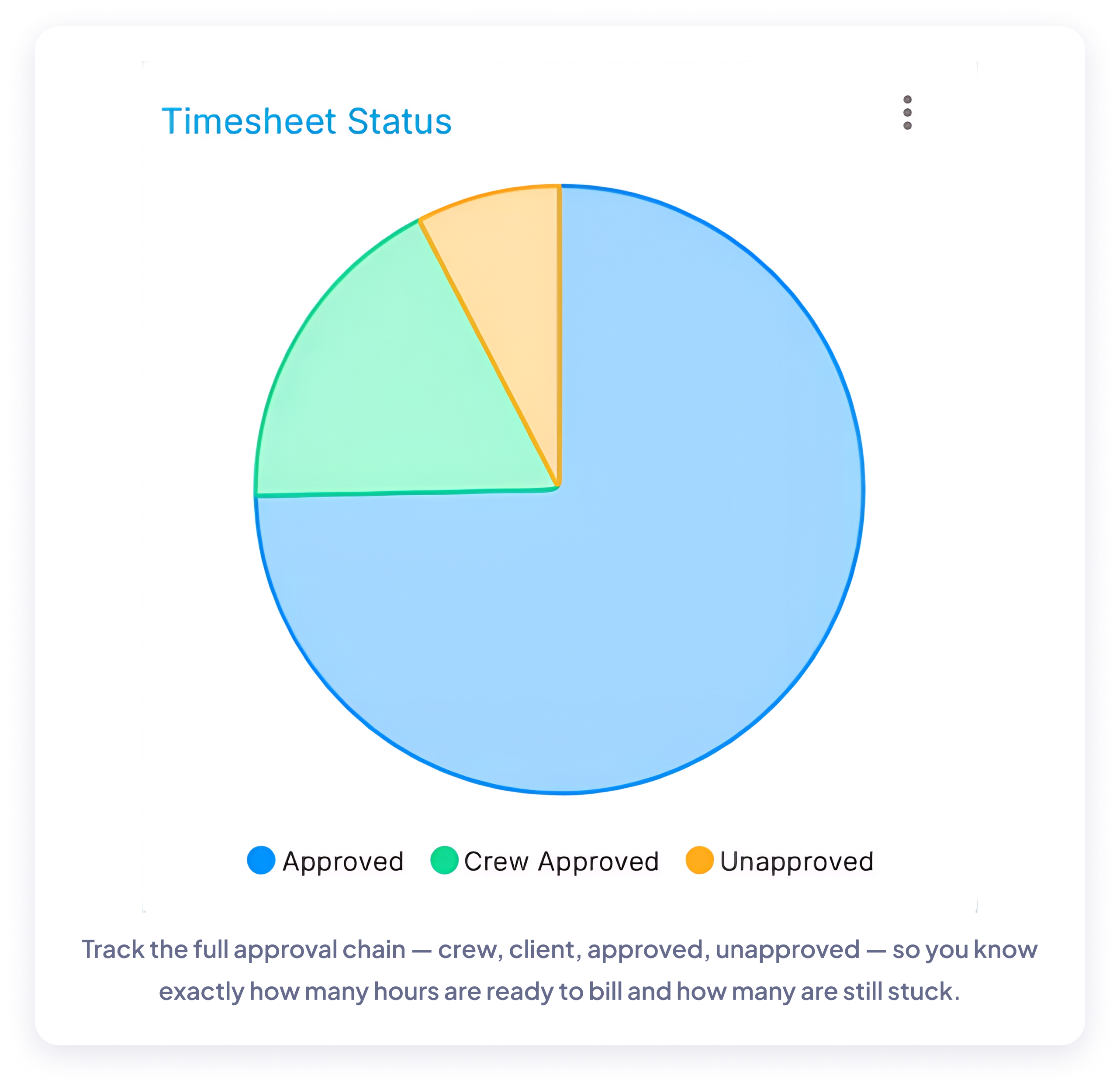
The same dashboards your team uses every day — overtime exposure, on-time performance, and how your Crew Members are clocking in.
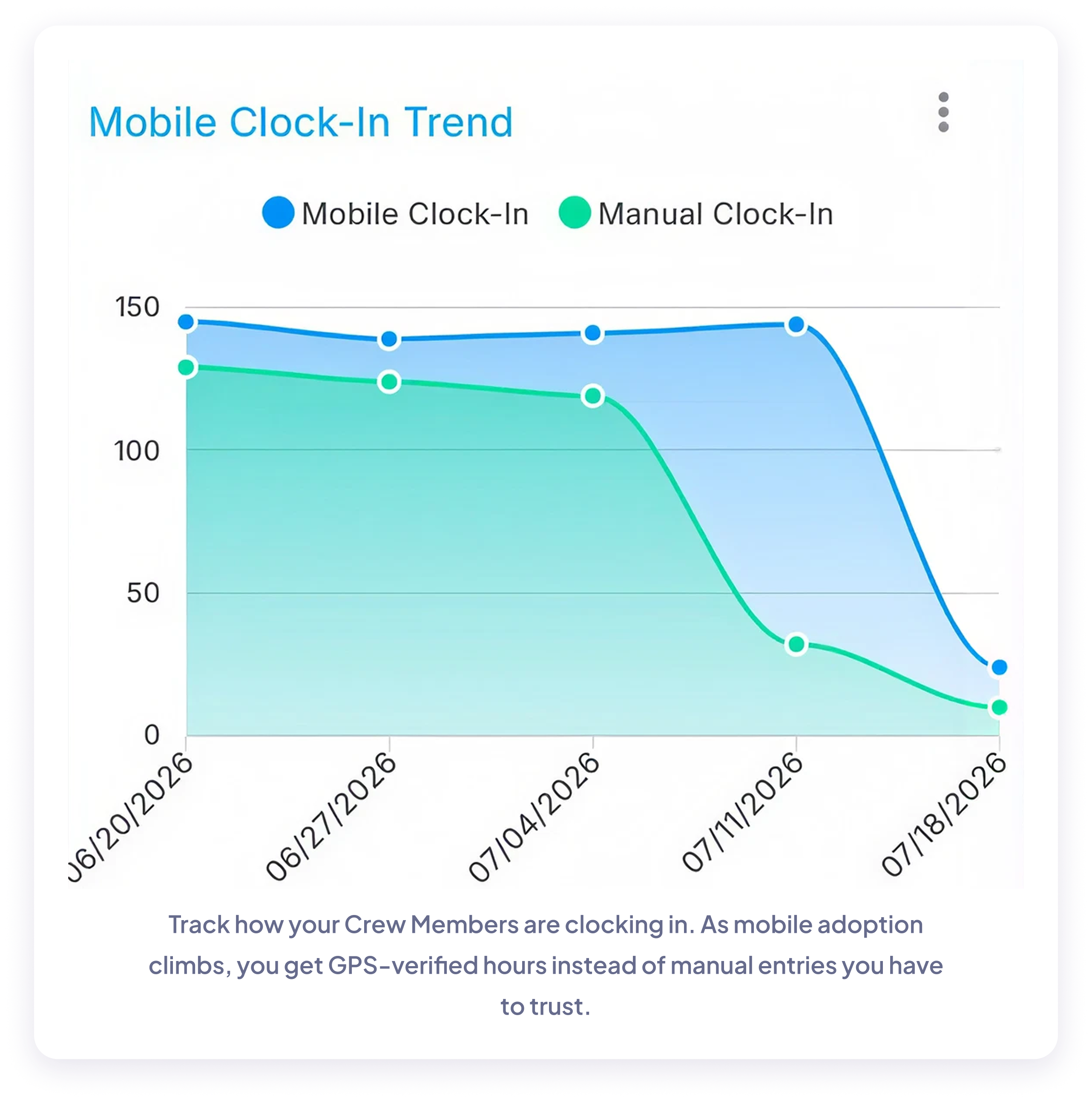
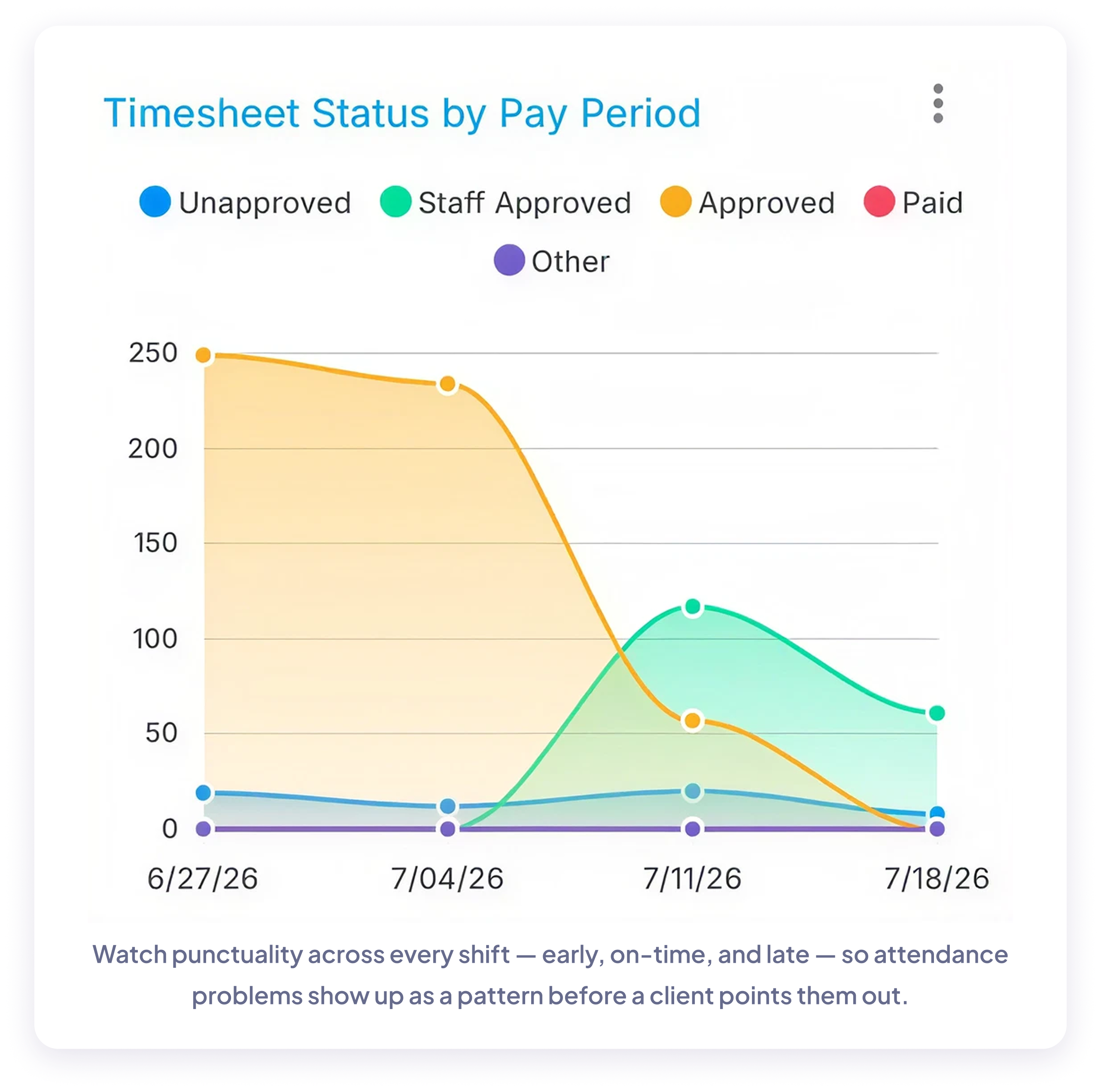
Enter a few numbers. See the real cost of chasing hours — every week.
Adjust the sliders to match your agency.
1
10
1
20 hrs
1
$60
1
500
1
10%
1
$75
Annual coordinator cost on timesheets
$18,200
Annual cost from billing errors
$3,900
Total annual cost of manual timesheets
$22,100
At your current rate and volume, your team spends an estimated $18,200/year on manual timesheet reconciliation — and leaves $3,900 on the table in billing errors. That's $22,100 total that NextCrew can give back.
Practical guides and resources built for staffing coordinators, owners, and back-office teams.
BLOG POST
Managing timesheets across many Crew Members, sites, and clients is where the hours slip. A practical look at streamlining the whole process.
Read the guide
BLOG POST
How GPS geo-fencing eliminates buddy punching, reduces disputes, and protects your margins on every shift.
Read the guide
BLOG POST
Letting clients review and approve hours themselves removes the back-and-forth — and speeds up payroll and invoicing.
Read the guideFROM THE BLOG — BUYER'S GUIDE
What to Consider When Selecting a Timesheet Staffing Solution
What actually separates staffing timesheet software from a single-employer time clock — rate complexity, client approval, and the handoff to payroll and invoicing.
Manual timesheet reconciliation isn't just slow — it's expensive. Every missed rate, disputed hour, and duplicate payroll entry is money your agency already earned and handed back.
$12,740
The average staffing coordinator spends 5–7 hours per week reconciling timesheets manually. At $35/hour across 52 weeks, that's up to $12,740 per coordinator per year — spent on work that should take minutes.
3%
A 3% timesheet error rate on 100 shifts per week at a $25 bill rate costs your agency $3,900 per year in unbilled or disputed revenue. Most agencies don't track it — which means most agencies don't know how much they're losing.
49%
The Workforce Institute at Kronos found that 49% of American workers begin searching for a new job after just two paycheck mistakes. Manual timesheet reconciliation is where most of those errors happen — and where retention quietly slips before HR ever sees the signal.
$5,475
Per SHRM's 2025 benchmark, the average cost per hire for a non-executive role is $5,475 — job postings, recruiter time, background checks, and onboarding. Every payroll error that pushes a Crew Member out the door is another $5,475 you weren't planning to spend — and that's before lost productivity.
Sources: The Workforce Institute at Kronos (payroll error retention impact); Society for Human Resource Management (SHRM) 2025 cost-per-hire benchmark, non-executive roles. Coordinator-cost calculation: 7 hours/week × $35/hour × 52 weeks.
The agencies growing fastest aren't working harder on timesheets. They've stopped working on them altogether.
Every hour captured. Every rate calculated. Every client approved. Join the agencies that closed the gap between timesheet chaos and getting paid correctly — every time.