

This playbook is for owners and operators of high-volume staffing agencies: events and experiential, hospitality and catering, light industrial and warehouse, healthcare per diem and travel, and anyone running on-demand work. If you fill hundreds of jobs a week across many clients and sites, your software decision differs from a direct-hire firm's. It replaces our 2021 guide, names no vendors, and comes with a scorecard.
Key takeaways
- High-volume staffing agency software has to cover the whole cycle: order, fill, day-of attendance, timesheets, payroll and invoicing. An ATS stops at the hire, where a temp agency's work begins.
- Volume multiplies every handoff. Count the handoffs before you count the features.
- The day of the job is where high-volume agencies win or lose clients. Test how a system handles a call-out, a no-show and a disputed timesheet, not just how it posts a job.
- Good AI does the watching for your team and shows its work. Your coordinators still pick the right Crew for each client, because nobody knows your clients better.
- At volume, the price swings on how a vendor counts your Crew Members and your text messages. Ask how seasonal peaks are billed before you sign.
The eight stages at a glance
- 1Check whether volume has outgrown your setup
- 2Map the software a high-volume agency runs on
- 3Write requirements for your kind of volume
- 4Decide: one platform or a connected stack
- 5Stress-test every vendor on your busiest day
- 6Test the open API, AI and self-service claims
- 7Price it at peak volume, not average
- 8Sign the right contract and switch outside peak season
What has changed for high-volume staffing agencies since 2021?
High-volume staffing agencies now expect their software to connect openly to other systems, to use AI to surface what needs attention, and to let clients and Crew Members serve themselves from a phone. Tracking candidates and exporting hours are now table stakes. What separates systems is how they behave on the day of the job, and how little anyone re-types afterward.
| Area | What buyers checked in 2021 | What high-volume agencies expect in 2026 |
|---|---|---|
| Filling jobs | A list to call down | Job notices to the right Crew Members by text, email and app at once, with the interested ones ranked |
| Attendance | Sign-in sheets and phone calls | Clock-in on the Crew app with location and photo, and a live view of every job running today |
| Clients | Orders by phone and email | Client self-service: place orders, see who has arrived, approve timesheets and invoices online |
| Pay and bill | Re-key hours into payroll, then into invoices | Approved hours flow into payroll and client invoices, with overtime already calculated |
| Integrations | "Does it export to our accounting system?" | An open API with published documentation, webhooks and pre-built partner integrations |
| AI | Rarely on the list | AI that flags risks and recommends next steps across hundreds of jobs, with a person deciding and every action logged |
What has not changed is the advice that opened our 2021 guide: buy software to fix a problem you can name, not because it's new. The stages below keep that discipline and add the checks a high-volume buyer needs in 2026.
Stage 1 of 8
Has your agency outgrown its current setup?
A high-volume agency has outgrown its setup when more orders mean more people re-typing, chasing and reconciling, instead of more clients and Crew Members. It shows up as the early-morning scramble, the no-show you hear about from the client, and the payroll week that eats your best people.
Tick every statement that is true for your agency today.
Self-check: 10 signs volume has outgrown your setup
0 of 10 ticked
Tick the statements that are true for your agency to see where you stand.
Before you look at a single vendor, ask your coordinators, recruiters and payroll staff where their day goes, especially on your busiest day of the season. Write down the five tasks they would most like never to do again. Those five tasks become the spine of your requirements in Stage 3.
Common mistake
Judging software on an average day. A system that copes with twenty jobs can fall apart at two hundred. Plan, test and price for your peak.
Stage 2 of 8
What software do high-volume staffing agencies use?
High-volume staffing agencies use software in three layers: front office tools to recruit, onboard and manage clients; operations tools to fill jobs and track attendance; and back office tools for timesheets, payroll and invoicing. The operations layer is where hundreds of jobs a week get filled, confirmed and checked in, and it is the layer most recruiting tools leave out. On top sit the Crew app and the client portal.
Where people meet your agency
Client portal · Crew mobile app
Front office
- Recruiting and applicant tracking (ATS)
- Onboarding documents and e-signature
- Clients, rates and site rules (CRM)
Operations · the high-volume core
- Orders, jobs and scheduling
- Job notices, offers and confirmations
- Clock-in, live attendance and no-shows
Back office
- Timesheets, approvals and overtime
- Payroll export or payroll
- Invoicing and receivables
Reporting and AI across all three layers
Fill rate, no-shows, margin by client, receivables, and what needs attention today
The words vendors use for these layers overlap, so pin them down before you compare anything:
- An ATS (applicant tracking system) moves candidates from application to hire. On its own it stops at the hire.
- A CRM tracks clients and prospects. In staffing it should also hold each client's rates and site rules.
- Temporary staffing software adds the operations layer: scheduling Crew Members to jobs, capturing time on site, and turning approved hours into pay and bills.
- Front and back office staffing software runs all three layers in one system, so a rate entered once on the client flows through to the timesheet, payroll and invoice.
- A VMS is your client's system for managing staffing suppliers, not yours. If large clients use one, ask how orders get from their vendor management system into your software.
On a tight budget? Our post on the staffing agency tech stack covers what to buy first.
Common mistake
Buying a recruiting tool built for direct hire and expecting it to run temp work. The gap shows up after the hire: scheduling, clock-in, timesheets and billing end up back in spreadsheets.
Stage 3 of 8
Which staffing agency software features matter most at high volume?
The staffing agency software features that matter most at high volume are the ones that remove work per job: self-service orders, fast job notices, verified clock-in, a live view of the day, and rates that flow from order to invoice without re-typing. Beyond that, each kind of work puts pressure somewhere different. Find your row.
| Your work | Where the pressure is | What the software must do |
|---|---|---|
| Events and experiential | Hundreds of Crew Members across venues for one date, a hard doors-open time, and a client who judges you on what they see | One order with jobs at different addresses, each client's site rules in the Crew app, live check-in the client can follow, and invoices built from approved hours |
| Hospitality and catering | Late requests, call-outs, and client managers who want to order without calling | Instant job notices by text, email and app, Crew sorted by distance, client self-ordering, and each client's preferred Crew first |
| Light industrial and warehouse | No-shows, attendance disputes and overtime across sites | Clock-in verified at the job site with GPS and photo, a live view of who has arrived, overtime calculated by location, and a reliability record for every Crew Member |
| Healthcare per diem and travel | Credentials, facility paperwork and travel pay packages | Expiry tracking with alerts, jobs visible only to credentialed Crew, license verification, and a profile packet you can export for a facility |
| On-demand, in any vertical | Crew Members pick up work from their phones, and clients book staff on their own | Open jobs sent to every matching Crew Member, a one-tap hand-raise in the app, and a client-facing on-demand staffing software marketplace, with the agency still deciding who is confirmed |
If you mostly place direct hire or contract professionals, such as IT, finance or executive search, you need a strong ATS and CRM more than a scheduling and pay engine, and much of this playbook won't apply to you.
Now turn your list into weighted requirements: must-have or nice-to-have, a weight from 1 to 5, and one sentence on why. Weights stop the loudest person in the room from deciding. A starting set for a high-volume agency:
| Requirement (example) | Type | Weight | Why it matters |
|---|---|---|---|
| Clients can place orders themselves | Must-have | 5 | Ends re-typed orders and after-hours calls |
| Job notices by text, email and app at once | Must-have | 5 | Fills early-morning gaps without a phone tree |
| Clock-in verified at the job site | Must-have | 5 | Proves attendance and settles disputes |
| Live view of today's jobs and no-shows | Must-have | 5 | You hear about a no-show before the client does |
| Rates set once flow to timesheets, payroll and invoices | Must-have | 5 | Stops billing errors at the source |
| Open API and payroll integration | Must-have | 4 | Keeps the payroll provider you already use |
| Credential expiry tracking and alerts | Must-have in healthcare | 4 | Keeps every expiry visible before it affects a job |
| AI that flags what needs attention | Nice-to-have | 3 | Coordinators start the day on exceptions, not lists |
Size changes the questions too: setup for a newer agency, permissions and branch-level reporting for a multi-branch one. See small agencies, mid-size agencies and enterprise staffing software.
Common mistake
Marking everything a must-have. If twenty items are must-haves, none of them is. Keep must-haves to the handful of things that would stop you signing.
Stage 4 of 8
Should a high-volume agency choose one platform or a connected stack?
Most high-volume agencies are better served by one platform for the core cycle, from order to invoice, connected to specialist partners for things like payroll, background checks and on-demand pay. A best-of-breed stack can work, but every handoff between tools repeats on every job.
| One platform | Best-of-breed stack | |
|---|---|---|
| Data entry | Entered once, used everywhere | Depends on how well each pair of tools connects, job after job |
| Where problems hide | In modules weaker than a specialist tool | In the gaps between tools, usually found at payroll or billing time |
| Day-of visibility | Schedule, clock-ins and no-shows on one screen | Scheduling in one tool, attendance in another |
| Reporting | Fill rate, margin and receivables in one place | Often exported and combined by hand |
| Flexibility | As open as its API and partner integrations | Swap any single tool, if the connections survive it |
| Usually suits | High-volume temp and on-demand agencies | Agencies with in-house technical help and one very specialized need |
One platform only works if it is genuinely open, which is why Stage 6 tests it. Our post on why integrations matter in staffing software goes deeper on the trade-offs.
Stage 5 of 8
How do you stress-test staffing software in a demo?
Stress-test staffing software by sending every vendor your busiest-day scenarios in advance and asking them to run each one live, on a data set the size of yours, while the people who will use the system watch and score. A standard demo shows the best path with ten jobs. You live on the other paths, with hundreds.
Send these six scenarios before the demo:
1. The big order
A client needs 40 Crew Members across three sites tomorrow. Show the order arriving from the client's own login, and how the right Crew Members hear about it.
2. The early-morning call-out
A confirmed Crew Member cancels 90 minutes before start. Show how you find, offer and confirm a replacement, and what the client sees.
3. The no-show at start time
Two Crew Members haven't clocked in. Show who finds out first, from which screen, and how you message them and backfill in minutes.
4. The disputed hours
The client says a Crew Member left early. Show where and when they clocked in and out, how a correction is tracked, and whether an invoice already sent changes.
5. The rate and overtime week
A client's bill rate rises mid-week, a holiday falls in the pay period, and a Crew Member works at two sites. Show where each change is made once and how overtime is calculated.
6. Close the week
Take a week of approved hours across every client to a payroll export and a batch of invoices, each in that client's format. Count the clicks and every field someone types twice.
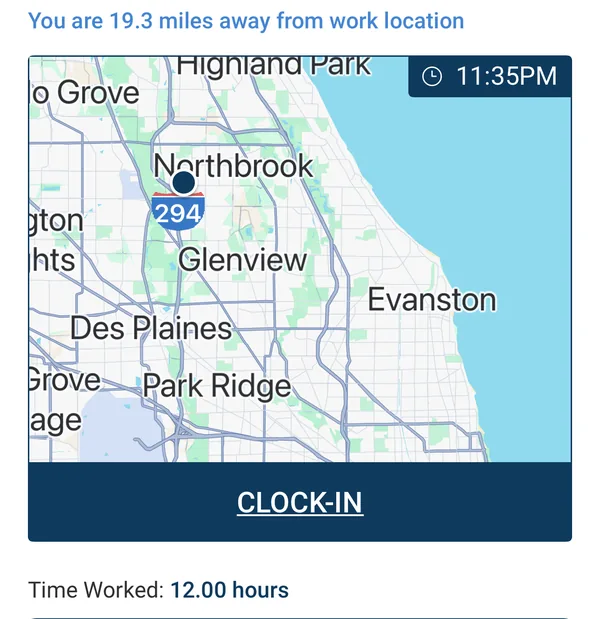
- Run it at your volume. Ask for a demo data set with hundreds of jobs, not ten. Screens that look clean with a few rows can be unusable at peak.
- Bring the users, not just the buyers. A coordinator, a recruiter and whoever runs payroll should each score the scenarios that touch their day.
- Separate "shipped" from "coming soon". For every feature you care about, ask: can I use this today, on my account, at the price you quoted?
Stage 6 of 8
How do you test open API, AI and self-service claims?
Test each claim by asking to see it working, not described: the API documentation, the log of what the AI did, and the screens your clients and Crew Members will actually use. Every vendor now says "open", "AI-powered" and "self-service"; the difference is in the evidence.
Open API: what "open" should mean
An open API lets your developers, or a partner's, read and write your data through documented endpoints without a custom project. High-volume agencies lean on it because payroll, on-demand pay and background checks all need the same approved data. The mistake is letting a file export be sold as an API.
Open API with public, testable documentation
Your team reads and writes records directly. Ask to open the docs before you sign.
Webhooks
The system pushes events out as they happen, such as a timesheet approved or a job filled.
Pre-built partner integrations
Payroll, background checks, on-demand pay and more, maintained by the vendor.
No-code connectors
No-code automation tools let non-developers automate simple workflows across thousands of apps.
Scheduled file exports
A file (for example CSV over SFTP) sent on a schedule. Reliable and common, but not an API.
Questions to ask about any integration claim:
- Can we see and test the API documentation before we sign?
- Which records can we read, and which can we write?
- Which events are pushed out as webhooks?
- Do partner integrations arrive set up, or do we start from a blank partner account?
AI: how is AI being used in staffing agencies?
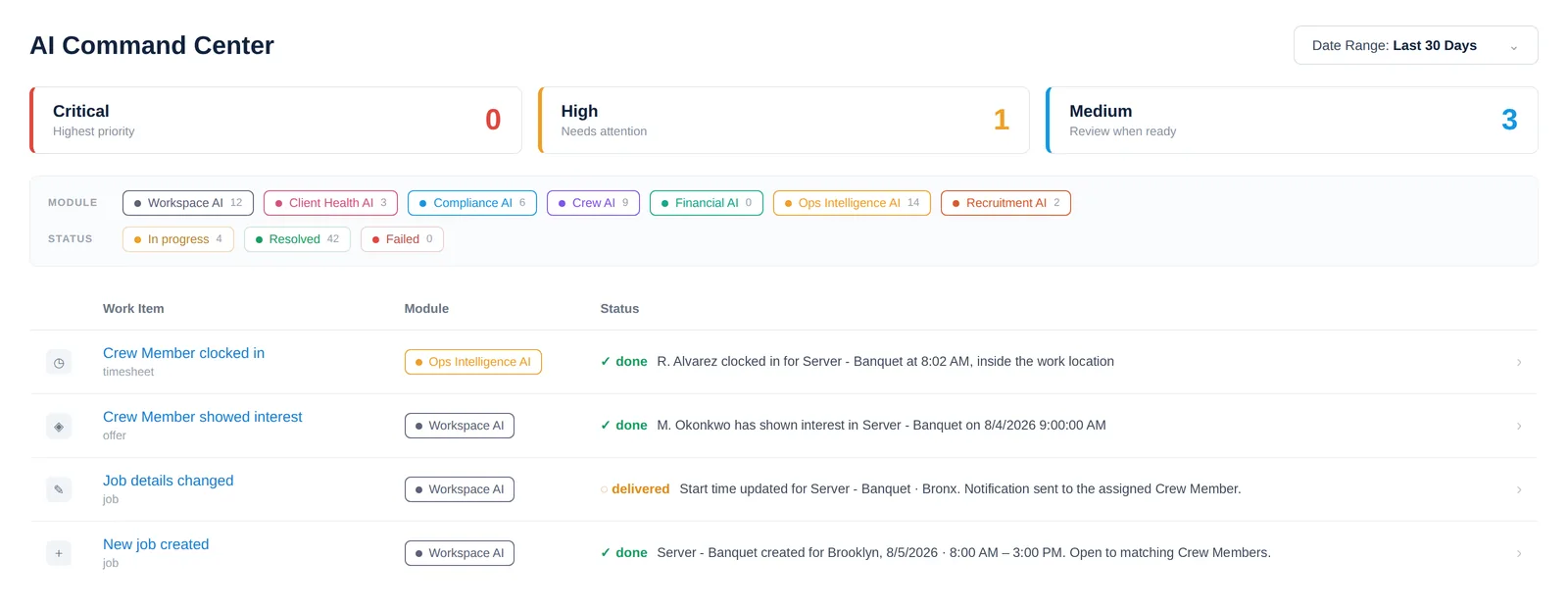
AI for staffing agencies is most useful where there is too much to watch, which at high volume is almost everywhere: reading resumes into profiles, searching the Crew pool in plain language, ranking who fits a job, and flagging a lapsing credential or a likely no-show early. The test is whether you can see what it flagged, who approved, and what happened next.
1 · Something happens
A license nears expiry, a job is still open, a clock-in is missing
2 · AI flags and recommends
Ranks the risk and suggests the next step
3 · A person decides
Your team approves where it matters
4 · Workflow runs, result logged
Messages, updates and outcomes are recorded for audit
Be wary of pitches for fully automated staffing. Agencies win clients by sending the right Crew: the people a particular client likes, who fit that site and that team. Your coordinators know that from experience, and clients pay you for it. Good software keeps each client's preferred Crew, Do Not Return list and ratings in one place and puts the strongest options in front of your team, who make the choice.
Questions to ask about any AI claim:
- What does the AI do today, in the product, on an account like ours?
- Can we see a log of what it flagged and what happened as a result?
- Where does a person approve before anything reaches a Crew Member, a client or payroll?
- Is AI included in the price, or billed separately as credits or a tier?
Watch out
Be careful with any system that says its AI approves hours, sends offers or changes pay on its own. In staffing, those decisions carry legal and client consequences. Useful AI saves your team the watching; your team should still make the call.
Self-service: the screens your clients and Crew Members will judge you by
Self-service means clients and Crew Members do routine tasks themselves, at any hour, without calling your office. At high volume it is the only way the office keeps up, and Crew Members choose agencies partly on how easy it is to pick up a job. Our guide to client self-service for staffing agencies covers the client side in depth.
Clients should be able to
- Place and change orders
- See who is confirmed and who has arrived, live
- Approve or question timesheets, and rate the Crew
- View, download and approve invoices
Crew Members should be able to
- See open jobs and raise their hand
- Confirm a job reminder with one tap
- Get directions and clock in from the site
- Complete onboarding and update availability
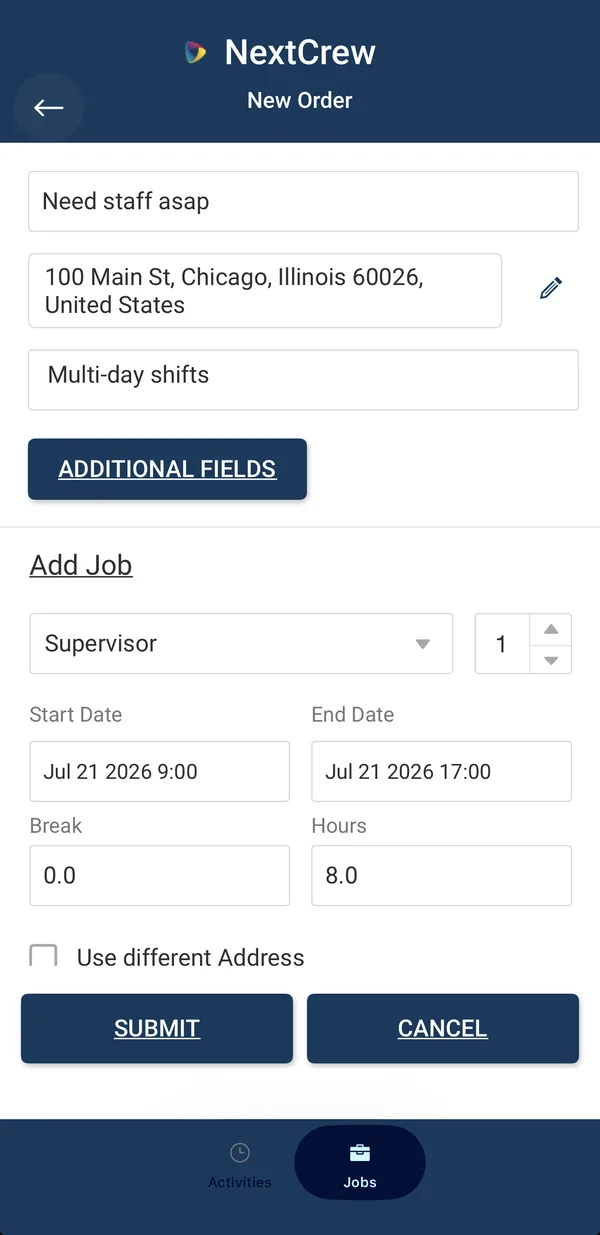
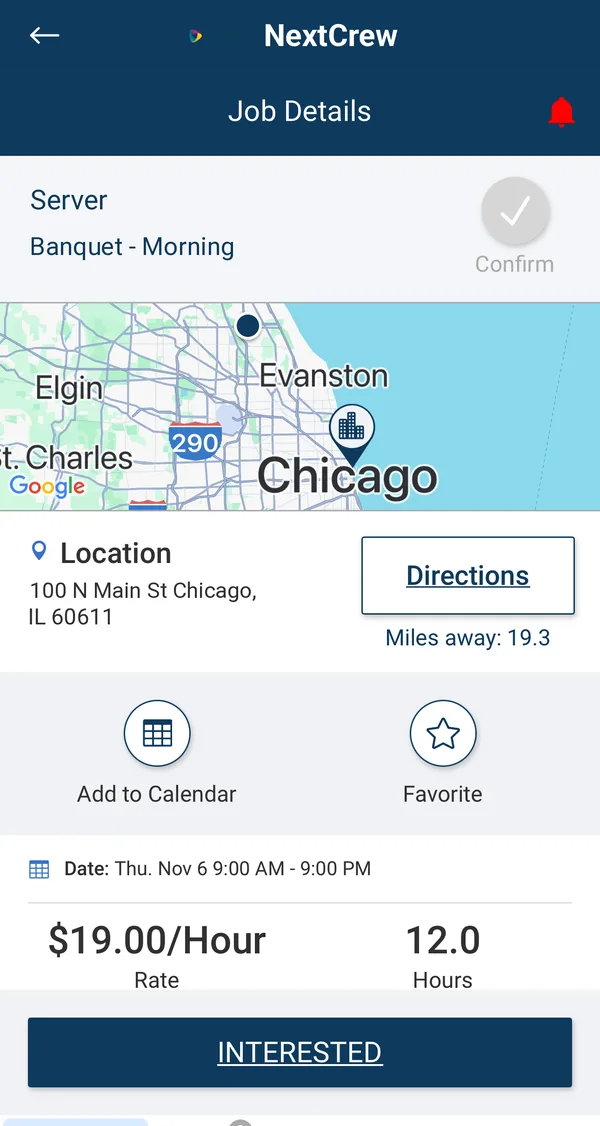
Ask each vendor how clients are invited, what happens for clients who still call, and whether the Crew app can carry your brand as a white label staffing app.
Stage 7 of 8
How much does staffing agency software cost?
Staffing agency software is usually priced per user, per active Crew Member, or as a platform fee with add-on modules, and the first-year cost also includes implementation, data migration and usage items such as text messaging. At high volume, two of those swing the total more than anything else: how a vendor counts your Crew Members, and what your text messages cost. Staffing software pricing is rarely published, so ask every vendor to quote the same list at your peak volume.
Usually in the quote
- Subscription: per user, per active Crew Member, or platform fee
- Modules or tiers you selected
- Minimum number of users or a minimum monthly fee
- Contract length and payment terms
At high volume, ask about
- How an "active" Crew Member is counted, and what your peak season costs
- Text messaging volume, and who pays the carrier
- Implementation, document setup and training
- Data migration and clean-up
- Partner integrations and their own fees
- AI features billed as credits or a higher tier
- Price increases at renewal
Then weigh the price against what you carry today: hours spent re-typing orders, chasing call-outs, fixing invoices and reconciling payroll, on every job. Our bill rate and markup calculators show what a single billing error costs.
Is free staffing agency software worth it?
Free staffing agency software is usually a limited tier of a general hiring or scheduling tool. It can carry a brand-new agency, but a high-volume agency outgrows it fast: free tiers rarely include timesheets, payroll or invoicing, and moving every record later costs more.
Stage 8 of 8
What should you check in the contract, and how do you switch without disrupting clients?
Before you sign, get in writing what implementation includes, how and when you can export your data, and what happens at renewal; then switch outside your peak season, one client or branch at a time. Most switching pain comes from promises never written down, or a go-live in the busiest month of the year.
Contract checklist
- Term and renewal: length, auto-renewal notice period, and any cap on price increases.
- Implementation scope: a written statement of work covering configuration, data import, documents and training.
- Your data: you own it, you can export it at any time, and you know the format you'll get if you leave.
- Support: response commitments in writing, and who answers your Crew Members' and clients' questions versus your internal team's.
- Security and access: role-based permissions, branch-level data, single sign-on and multi-factor options for your staff.
- Integrations: who builds and maintains each one, and what it costs if a partner changes.
How to switch staffing software without disrupting clients
Our 2021 guide ended with advice that still holds: roll out step by step. For a high-volume agency, that means six phases, timed around your season.
- 1
Plan
Pick a quiet stretch of the year, name an internal owner and choose the first client or branch.
- 2
Configure
Positions, client rates, pay codes, overtime rules, onboarding documents and permissions.
- 3
Migrate
Clean before you import. Clients, contacts and Crew Members first, history second.
- 4
Train
Hands-on sessions using your own data, one role at a time.
- 5
Run in parallel
One pay period on both systems for the first client or branch, then compare.
- 6
Go live, Crew first
Invite Crew Members to the app by text before their first job on the new system, then roll out client by client.
Five numbers tell you whether the new system is working. Measure them before you switch so you have a baseline:
- The share of timesheets that come from mobile clock-in rather than manual entry
- The share of orders clients place themselves
- Fill rate and time to fill
- Your no-show rate, and how fast you backfill
- Days from the end of a pay period to invoices sent
How NextCrew is built for high-volume staffing agencies
NextCrew is an AI-powered, end-to-end staffing platform built for high-volume staffing agencies, running recruiting, onboarding, scheduling, timesheets, payroll export and invoicing in one system. We have built staffing agency software since 2011 for events, experiential, hospitality, light industrial and healthcare agencies across the US and Canada. Here is how it answers this playbook's tests.
Stages 4 and 5
One record from order to invoice
Rates, contacts and site rules on the client record flow into every job, timesheet, payroll export and invoice. Each invoice keeps a snapshot of its timesheets, so a later edit never changes what the client received.
Scenarios 1 and 2
Filling at volume
Send a job to every matching Crew Member, or push it out right away by text, email and app. For targeted fills, job scheduling narrows by recent activity, distance, rating, position and the client's favorites, and a Do Not Return list keeps flagged Crew Members off that client's jobs.
Scenario 3
Control on the day of the job
Crew Members get the details on assignment, a reminder the day before that they confirm with one tap, and a clock-in prompt on the day. Daily Pulse shows every job running today, across time zones, with who is on site, late or a no-show, so you can message and backfill from one screen.
Scenario 4
Proof of attendance
Geofenced clock-in on the Crew app records GPS and a photo. A kiosk on any internet-connected device and supervisor entry cover sites where phones are a problem, and all three land on the same timesheet. Clients approve hours and rate the Crew in their portal.
Scenarios 5 and 6
Pay and bill without re-keying
Overtime is calculated as hours come in, using your rules for each location. Approved hours export to the payroll provider you already use, and batch invoicing applies each client's own rates, format and grouping, with timesheet attachments included.
Self-service
Clients and Crew who serve themselves
In the client portal, clients order, follow check-ins, approve timesheets and approve invoices. In the Crew app, Crew Members pick up jobs and see each client's site rules before they arrive. Texts go out from your own number, every reply lands back in NextCrew, and the app can carry your brand.
Compliance
Credentials that stay visible
NextCrew keeps every expiry visible across the pool and flags what is lapsing well ahead, on the Crew Member's phone and your team's dashboard. Jobs can be limited to credentialed Crew, and a Crew profile with license and certificate images exports as one PDF for a facility or a brand.
Stage 6
Open, with AI that shows its work
An open API with documentation you can test in the browser, self-service API keys and webhooks, plus partner integrations that arrive with standard packages your team can adjust. CrewPilot AI parses resumes, answers plain-language questions about your data and powers the AI Command Center. AI flags; your team decides.
The screens shown through this playbook come from the NextCrew demo environment, with some names and details changed. To see them run your own stress-test scenarios, request a demo.
- For multi-branch agencies. Permissions by role, group, location and user; field-level control over pay rates, bill rates and other sensitive data; branch-level separation; and single sign-on through Okta.
- Implementation done with you. Discovery, configuration, data import, document setup and hands-on training on your own data: 40 to 60 hours or more of work by our team.
Get the Staffing Software Scorecard
A spreadsheet with the weighted requirements from Stage 3, the six stress-test scenarios from Stage 5 with a scoresheet, and the contract checklist from Stage 8. Email us and we'll send it over.
Frequently asked questions
About the author. Chirag Mehta is the founder and CEO of NextCrew, which he started in 2011 to give high-volume staffing agencies one system for the whole cycle, from client order to paid invoice. This playbook is part of the NextCrew Playbook series and replaces our 2021 staffing software buyer's guide.