

The Staffing Agency Tech Stack: What to Buy and in What Order
Updated
A staffing agency tech stack is the set of systems that hold your data, run your daily work, and tell you how the business is performing. Most agencies already own pieces of one. The question is rarely which tools to buy first — it is which of your current bottlenecks a tool would actually remove, and whether the systems you keep can share a record with the ones you add.
That framing matters because the usual approach is backwards. Agencies shop for staffing agency software by category — an applicant tracking system, a CRM, a scheduling tool — and end up with six systems that each solve a problem well and none that talk to each other. The result is a coordinator re-keying the same placement into three screens. This is how to build a stack that avoids that, and how to decide what you need before anyone books a demo.
Key takeaways
- A stack has three jobs, not twelve. Hold the record, run the work, and show you what happened. Every tool you own should be doing one of those, and you should be able to say which.
- Start from the bottleneck, not the category. The right first purchase is whatever your team is currently doing by hand most often, not whichever category a vendor is selling hardest.
- Integration is the whole game. Six good systems that cannot share a record are worse than four that can. Ask how a tool writes back before you ask what it does.
- Keep what works. A legacy system your team is fluent in and that exposes its data is not technical debt. Replacing it costs training and goodwill you may not get back.
- Analytics comes last and depends on everything before it. Reporting is only as good as the records underneath, so a dashboard bolted onto messy data produces confident wrong answers.
What is a staffing agency tech stack?
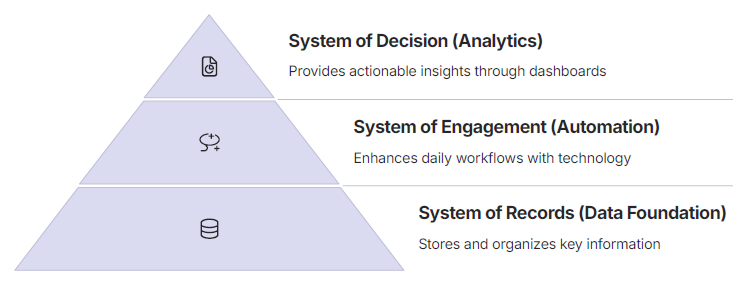
A staffing agency tech stack is the layered set of systems that store your data, run your daily operations and report on both. It is useful to think of it in three layers, because it tells you what a tool is for, stops you buying two things that do the same job, and maps cleanly onto how staffing agency operations actually run.
-
1
System of record — where the truth lives
Crew Member profiles, client and site details, credentials, placement history, pay and bill rates. An applicant tracking system usually sits here. If two systems disagree about a fact, this layer is what settles it — which only works if you have decided which system owns each fact.
-
2
System of engagement — where the work happens
Scheduling and dispatch, the Crew app, the client portal, messaging, and the automations that send confirmations and reminders. This is the layer your team lives in all day, so it is the layer where poor usability costs you the most hours.
-
3
System of decision — where you find out what happened
Fill rate, time to fill, margin by client, no-show rate, source of hire. Staffing analytics belong here, and they inherit every weakness in the two layers below. Build this last.
What does each part of the stack have to do?
Eleven functions cover almost every agency, and the useful way to read the list is as a checklist of what you currently handle by hand. Wherever the right-hand column describes something a person is doing manually today, you have found a candidate for the next purchase.
| Function | What it has to do |
|---|---|
| Recruiting | Capture applicants from every source into one pipeline, without re-keying |
| Onboarding | Collect documents, run screening, and get someone work-ready without a coordinator chasing paperwork |
| CRM | Hold client relationships, contacts and follow-ups where the whole team can see them, not in one person's inbox |
| Job management and scheduling | Match open shifts to eligible Crew Members and let them accept on a phone, instead of a recruiter working a call list |
| Timesheets | Capture hours with evidence attached and get them approved within a day of the shift |
| Payroll | Take approved hours straight through to pay, with the rate rules already applied |
| Compliance and credentialing | Keep every expiry visible across the pool and flag what is lapsing well ahead, so eligibility is a rule rather than a memory |
| Invoicing | Bill from the same approved hours that ran payroll, so the two can never disagree |
| Self-service | Let Crew Members manage availability and credentials, and clients raise and approve their own work |
| Workflow automation | Send the confirmations, reminders and timesheet nudges nobody should be sending by hand |
| Reporting | Answer fill rate, time to fill and margin by client without anyone building a spreadsheet first |
Workflow automation for staffing agencies is the row people skip, and it is usually the cheapest win on the list, because it removes work without anyone changing how they do their job.
What goes wrong without a proper stack?
The damage is rarely one dramatic failure — it is a steady tax on every placement that only becomes visible when you try to grow. Five costs show up in that order.
- Time going to re-keying. The same placement typed into three screens, every time. It never appears on a report because nobody counts it.
- Errors that reach a client or a payslip. Manual transfer between systems is where wrong rates and missed hours come from, and both are expensive to unwind.
- A slower experience than the alternative. Crew Members who wait on a call and clients who wait on an email will use whoever does not make them wait.
- Growth that needs headcount. When volume only scales by adding coordinators, every new account costs margin instead of adding it.
- Questions you cannot answer. Which client is actually profitable, which source produces reliable Crew Members, where fills are being lost. Without the records, these stay opinions.
Watch out
Buying a reporting tool to fix a data problem is the most common expensive mistake here. If placements, hours and rates are inconsistent in the systems underneath, a dashboard does not reveal that — it renders it as a confident chart. Fix the record first.
How do you decide what to buy?
Work from your own bottlenecks and constraints rather than from a category list, and the order of purchases decides itself. Six questions, answered honestly before any demo, will do most of the work.
-
1
Where does the work actually stall?
Track one week of coordinator time by task. The answer is usually not what anyone predicted, and it names your first purchase for you.
-
2
Which tasks need no judgment?
Shift confirmations, reminders, document chasing, timesheet nudges. Repetitive work with a clear rule is what automation is good at. Anything needing a decision is not on this list.
-
3
What are your clients asking for?
Requests that keep recurring — live visibility of who is on site, self-service ordering, reporting in a particular shape — are the cheapest roadmap you will ever get, because someone has already agreed to value them.
-
4
What does your team actually run well?
A powerful tool nobody adopts returns nothing. Weigh the training your team can absorb this quarter, not the feature list, and ask the people who will use it daily before you sign.
-
5
What are you keeping, and can it share?
Decide what stays before you shop. Then ask every candidate tool how it reads from and writes back to those systems — an API or webhook you can actually use, not a promise of a future connector.
-
6
Where do you want to be in two years?
A new vertical, a second region, or twice the volume with the same team all change the answer. Buy for the agency you are building, but only where that costs nothing today.
When you are ready to compare vendors, our buyer's playbook for high-volume staffing agencies walks through requirements, demo scenarios, pricing and rollout, with a scorecard to keep the comparison honest.
Bottom line: There is no perfect tech stack for staffing agencies, only one that fits how your agency works and gets out of its own way. Start from the bottleneck that costs you the most hours, insist that whatever you add can share a record with what you keep, and leave analytics until the data underneath is worth reporting on.
Two companion posts cover the parts this one only touches: why spreadsheets stop scaling, and whether your matching knowledge sits in people or in data.
See what a single connected system removes
NextCrew runs recruiting, onboarding, scheduling, compliance, timesheets, payroll and invoicing on one record, and connects to what you keep. Walk through it with a live demonstration against your own workflow.
Book a demo