
How to Mass Text Employees at a Staffing Agency, Legally
Updated · 7 min read
To mass text employees at a staffing agency, send from a registered business number instead of a personal phone, text only Crew Members who agreed to receive texts, target each message to the people it applies to (working today, a job, a certification or a location), use a short template with the person's first name and one clear action, honor STOP replies, and keep a log of what was sent, delivered and answered. A group text from a personal phone fails on almost every one of those points.
Most coordinators already fill jobs by text. The real question is whether you can send one message to 200 people, get the right replies back, and prove later what went out.
Key takeaways
- Group texts from personal phones leave no record, expose Crew phone numbers and prove nothing about delivery.
- Under FCC rules, a reply such as STOP revokes consent, and the request must be honored within ten business days at most.
- Business texting from a standard 10-digit number in the US requires A2P 10DLC brand and campaign registration.
Why do group texts from personal phones fail?
Group texts from a coordinator's own phone fail because nothing about them is built for running a staffing business. They work for five people. At 50 or 500 they break:
- No record. The thread lives on one phone, not on the Crew Member's file.
- Reply-all chaos. One "who else is going?" buries the reply that matters.
- People leave. When a coordinator moves on, the history goes with their phone.
- Exposed numbers. Everyone in the group sees everyone else's phone number.
- No proof of delivery. You cannot tell who got the cancellation.
- Compliance risk. Nobody tracks who agreed to texts or replied STOP.
What should you send by text, email or push?
Send by text anything short and time-sensitive that needs a reply; send by email anything long or that needs an attachment; use app push for Crew Members who already work in your app.
| Channel | Best for | Avoid for |
|---|---|---|
| Text (SMS) | Job offers, day-before reminders, location changes, cancellations, quick confirmations | Policies, pay details, anything sensitive or long |
| Onboarding steps, site instructions, handbook updates, documents | Anything needed in the next two hours | |
| App push | New jobs posted, schedule changes, timesheet reminders | Crew Members who rarely open the app |
What are the consent and opt-out basics for texting Crew?
Get consent before you text, make opting out easy, honor every opt-out quickly, and register your business number with the carriers. In the US, texts are treated like calls under the Telephone Consumer Protection Act (TCPA). Under FCC rules, automated texts to a mobile number need the recipient's prior express consent, and texts that advertise or market need prior express written consent (47 CFR 64.1200(a)(1)–(2), eCFR, current as of October 2026). Wireless industry guidance expects express permission for informational texts such as reminders and alerts (CTIA, Messaging Principles and Best Practices, May 2023).
-
1
Capture consent at onboarding
Ask plainly whether the Crew Member agrees to job-related texts at that number, and keep the dated answer on their record.
-
2
Honor STOP and plain-language opt-outs
FCC rules treat a reply of "stop," "quit," "end," "revoke," "opt out," "cancel" or "unsubscribe" as a revocation of consent, require other reasonable requests to be honored too, and set a limit of ten business days to act on them. One confirmation text is allowed if it only confirms the opt-out (47 CFR 64.1200(a)(10) and (a)(12)).
-
3
Register for A2P 10DLC
US carriers require anyone sending application-to-person texts from a standard 10-digit number to register a brand (who is sending) and a campaign (what the texts are for and how people opt in and out). Unregistered traffic faces extra carrier fees and heavier filtering (Twilio, "Programmable Messaging and A2P 10DLC," updated July 2026).
-
4
Keep sociable sending hours
The FCC's 8 a.m. to 9 p.m. window formally covers telephone solicitations (47 CFR 64.1200(c)(1)), not job texts. It is still a sensible default for everything but urgent same-day changes.
Please note: This is general information, not legal advice. State laws can be stricter; confirm your practices with counsel.
How do you segment a mass text to employees?
Segment by who the message actually affects, so every Crew Member only gets texts that apply to them. Texting the whole pool about one site trains people to ignore you.
- Working today. Weather alerts and same-day changes.
- By job or order. Reminders and site instructions.
- By certification or skill. Only forklift-certified Crew for a forklift job.
- By location. Crew who can actually reach the site.
What should mass text templates for Crew say?
A good template names the person, states the job, time and place, and asks for one reply. Identify your agency and include opt-out wording in the first text to a new number. Illustrative examples, placeholders in braces:
| Message | Send to | Template |
|---|---|---|
| Job offer | Qualified Crew near the site | {Agency}: Hi {FirstName}, a {Position} job is open at {Site} on {Date}, {StartTime} to {EndTime}. Reply YES to claim it. Reply STOP to opt out. |
| Day-before reminder | Everyone booked on the job | Hi {FirstName}, reminder: you're working at {Site} tomorrow at {StartTime}. Reply C to confirm or call us if anything has changed. |
| Location change | Everyone booked on the job | Hi {FirstName}, today's job has moved to {NewAddress}. Same start time. Reply OK so we know you saw this. |
| Weather or cancellation | Working today at the affected site | Hi {FirstName}, {Site} is closed today due to weather. Please don't travel in. We'll text you about rescheduling. |
| Timesheet reminder | Crew with missing clock-outs | Hi {FirstName}, your timesheet for {Date} is incomplete. Please clock out in the app today so you're paid on time. |
How do you personalize a mass text without getting it wrong?
Personalize with fields you trust, and check them before you hit send. A first name and job details pulled from your system make a mass text read like a direct message. A blank field ("Hi ,") or the wrong site reads like spam. Send yourself a test first, and never put Social Security numbers or medical details in a text.
How do you measure delivery and replies?
Measure four things for every send: how many were delivered, how many failed, how many replied, and how many opted out. Failures usually mean a dead number; low offer replies usually mean targeting that is too wide. Then connect confirmations to attendance: a confirmed Crew Member who misses the job is a no-show, and repeats are worth tracking. See how to prevent and track no-shows.
How does NextCrew fit?
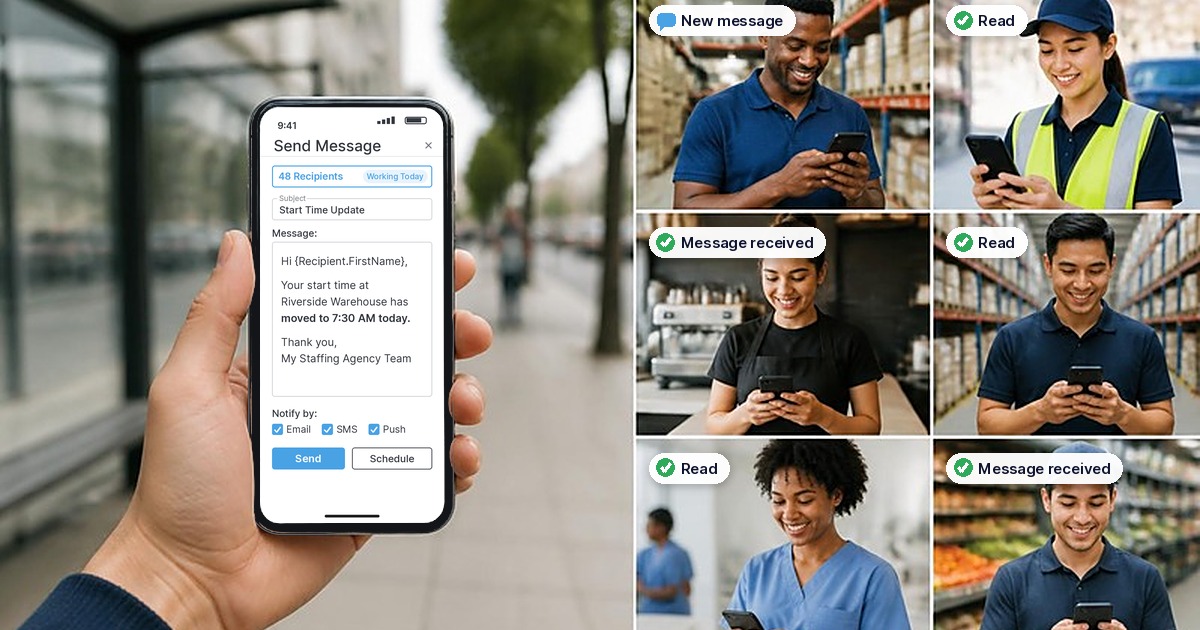
NextCrew is staffing agency software that works as a mass texting service for employees, built into the same record you schedule and pay from. One message goes out by email, SMS and push. SMS sends from your agency's own number through the Twilio integration, activated in the App Marketplace, with A2P 10DLC registration as US carriers require. Replies come back into NextCrew on the Crew Member's record, not to someone's personal phone.
- Targeting. Send to Working Today, a group by skill, certification, location, tag or vertical, Crew near a site, everyone on a job or order, or a selected list.
- Templates and personalization. Save the messages above as templates and fill names with macros like {FirstName}.
- Scheduled messages. Write reminders now, send them at a sensible hour.
- Message log. Every message is logged with delivery status, timestamp and channel, so you can show who was told what and when.
Push messages reach Crew in the app they use for HR self-service. For ongoing conversation around a single job, a group chat inside NextCrew (Channels) is launching, so the team, Crew and client can talk in one place without sharing personal numbers.
Frequently asked questions
Sources
- Office of the Federal Register and US Government Publishing Office, eCFR, 47 CFR 64.1200, "Delivery restrictions" (paragraphs (a)(1), (a)(2), (a)(10), (a)(12), (c)(1)), accessed October 9, 2026.
- CTIA, "Messaging Principles and Best Practices," May 2023.
- Twilio, "Programmable Messaging and A2P 10DLC," documentation last updated July 7, 2026.